The first run of a data copy is interactive: you pick the tables, check the mapping, watch the log. The tenth run should not be. Once a copy works, it belongs in a job that runs the same way every night.
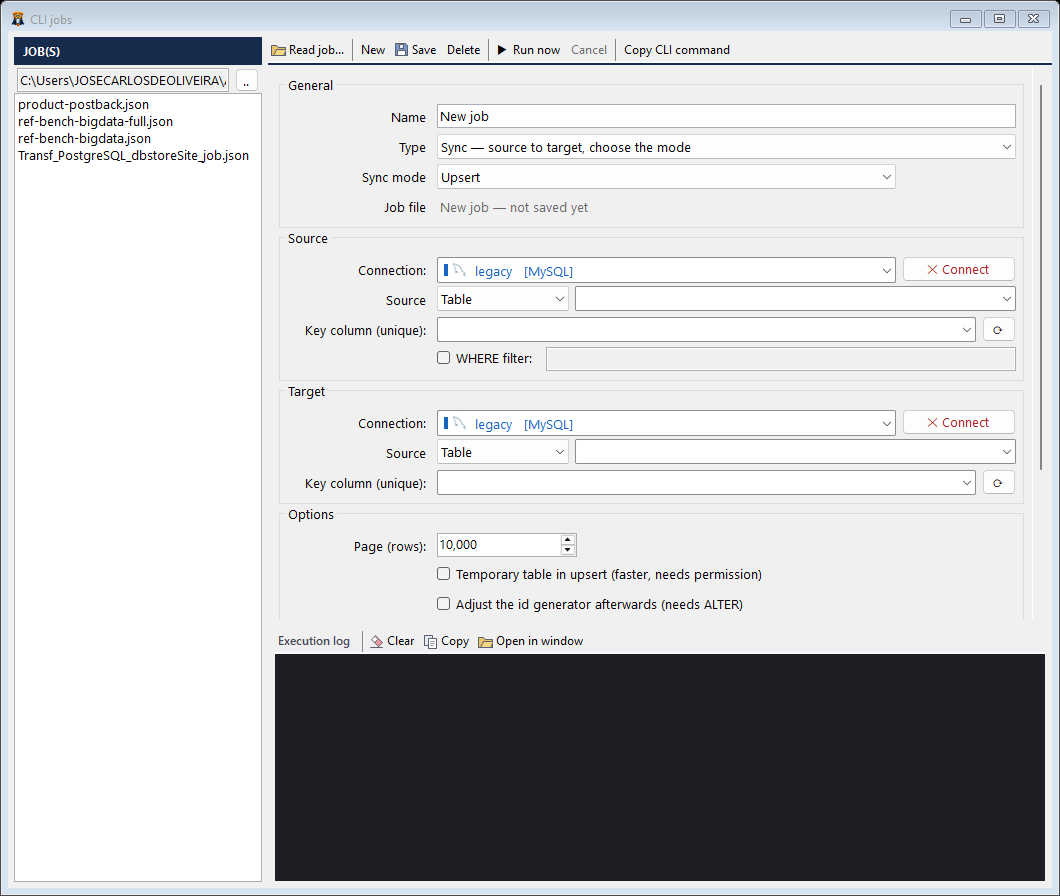
One job file per task
In dbSlice, everything you set on screen for a copy, an export or a status check can be saved as a job file: connections, source and target, key column, mode, masking rules. The CLI jobs editor (Tools → CLI jobs) creates and edits them, and dbSlice --new <type> scaffolds a commented template.
Run it with one command
dbSlice nightly-orders-sync.json nightly-orders-sync.logThe second argument is optional and sets where the log goes.
The job writes a log and returns an exit code, so the script or scheduler that called it knows whether it worked. Credentials stay in the saved connections, not in the job file you share with the team.
Schedule it
- Windows: create a task in Windows Task Scheduler that runs the command at 02:00.
- Linux scripts: the same job runs from cron.
Tip: schedule the status job (the key-by-key comparison) right after the copy job. If the copy missed something, you know before anyone opens a report in the morning.
Good habits for scheduled copies
- One job per table group, so a failure points at the right place.
- Keep job files under version control; review changes like code.
- Don't let two runs of the same job overlap: give each run enough time, or chain them in one script.
The full walkthrough, with the job options, is on database sync from the command line.
Update: since 22 September 2026 the free version of dbSlice is also on the Microsoft Store.