
What a job can do
| Job | What it does |
|---|---|
| Sync | Copies rows from a source to a target in one of six modes, including Postback: upsert, insert new, initial load, update only, full reload |
| Export | Writes a table or query to a file (CSV, JSON, Excel, SQL scripts and more) |
| Status | Compares source and target without writing: counts, missing keys, differences |
Jobs can mask sensitive columns and filter rows with a WHERE clause, exactly as in the app.
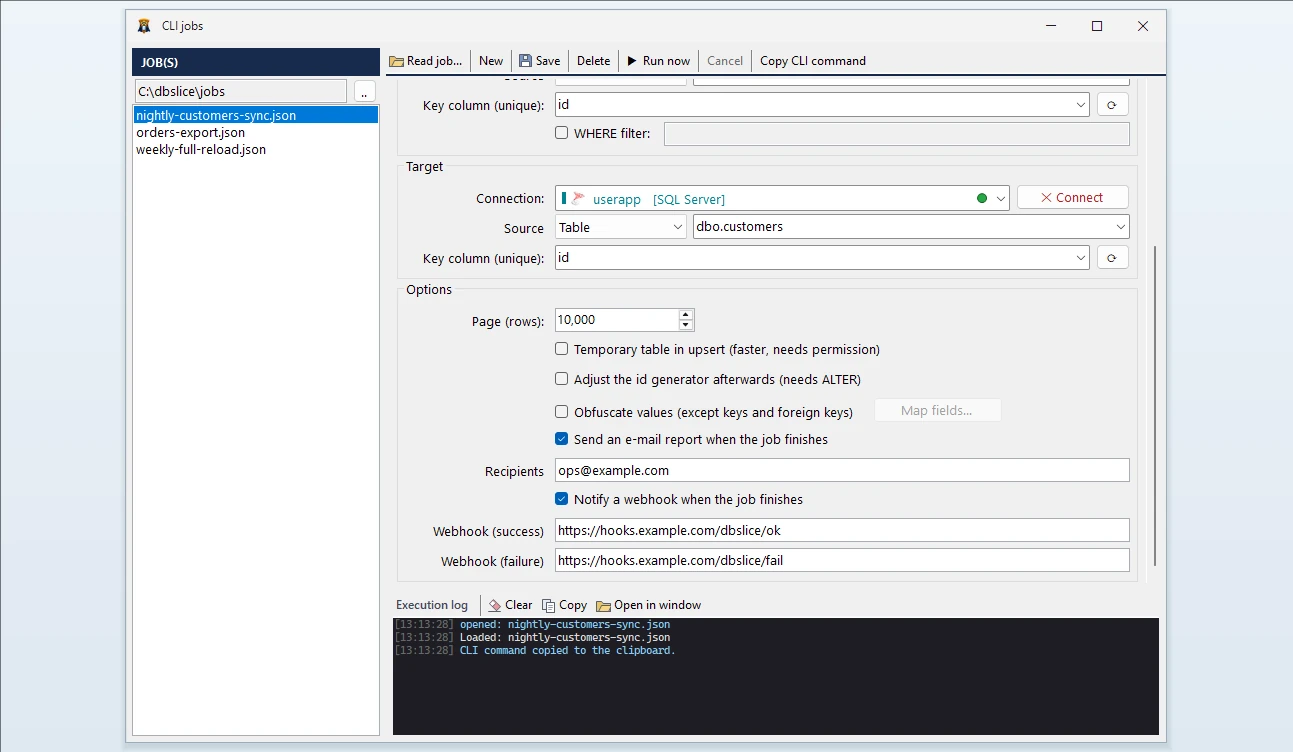
Build it visually, run it anywhere
- In Tools → CLI jobs, create the job with the same screens you use for a manual sync: connect, pick tables and the key column, choose the mode.
- Run now to test it from the app.
- Copy CLI command and paste it into the scheduler:
dbSlice "C:\jobs\orders-to-postgres.json" "C:\jobs\logs\orders.log"
Made for unattended runs
- No passwords in the job file. Jobs refer to saved connections by environment and name; the credentials stay protected on the machine. The JSON can go into version control.
- Exit codes a scheduler can act on:
0success,1failure,2invalid job. - E-mail report when the job ends, through your SMTP server.
- Webhooks on success and on failure: an HTTP POST with the job name, connections, row counts, duration and error. Point it at Slack, Teams, n8n or your own endpoint. A failed notification never fails the job.
- OpenTelemetry (optional, off by default): rows, duration and errors of each run in your monitoring tool — an OpenTelemetry Collector, Datadog, Dynatrace, New Relic, Grafana Cloud or Elastic. No SQL and no data are sent; job and table names only if you allow it.
- A log file per run, next to the history kept in the app.
Typical schedules
- Nightly replica refresh: Upsert from SQL Server into a PostgreSQL reporting database, incremental by an
updated_atcolumn. - Morning reconciliation: a Status job compares source and target and e-mails the differences before anyone starts work.
- Weekly masked staging refresh: sync jobs with masking for the tables that hold personal data.
- Exports for BI or partners: a query exported to CSV or Excel at the same time every day.
Desktop or Server edition
The Desktop license is for one named user on one machine. For jobs that run unattended on a Windows Server, use the Server edition (one Windows Server installation).