
Skip to content
dbSlice®
Product Who it's for Performance Pricing Blog Guides Support Buy dbSlice

dbSlice / Use cases

Send database rows to Kafka or a REST API, without writing a producer

You need the rows of a table as messages: to seed a new service, replay history into a topic, feed a partner API, or load a test environment. Usually that means writing and maintaining a small producer. dbSlice does it from a Windows app or the command line: pick the rows, shape the JSON, preview it, and send.

Try it free on the Microsoft Store ↗ See pricing

At a glance

  • What it does: turns table rows into JSON messages and sends them to Kafka, Redpanda, Pulsar, RabbitMQ, a REST or SOAP API, a gRPC method or a stored procedure, with a preview first.
  • Engines: the source is a table, view or SELECT in SQL Server, PostgreSQL, Oracle, MySQL, MariaDB, Firebird, SQLite or InterSystems IRIS, or a JSON or CSV file.
  • What it does not do: guarantee exactly-once delivery, capture changes as they happen, use a Schema Registry (Avro, Protobuf) or consume from topics and queues.
  • Free or paid: try it in the free Microsoft Store version (no license key); sending needs a Desktop or Server license.

Where the data comes from and where it goes

  • From: a table, view or SELECT in SQL Server, PostgreSQL, Oracle, MySQL, MariaDB, Firebird, SQLite or InterSystems IRIS; or a JSON or CSV file.
  • To: Kafka, Redpanda, Apache Pulsar, RabbitMQ, a REST API, a SOAP service, a gRPC method, or a stored procedure in another database.

The source is only read.
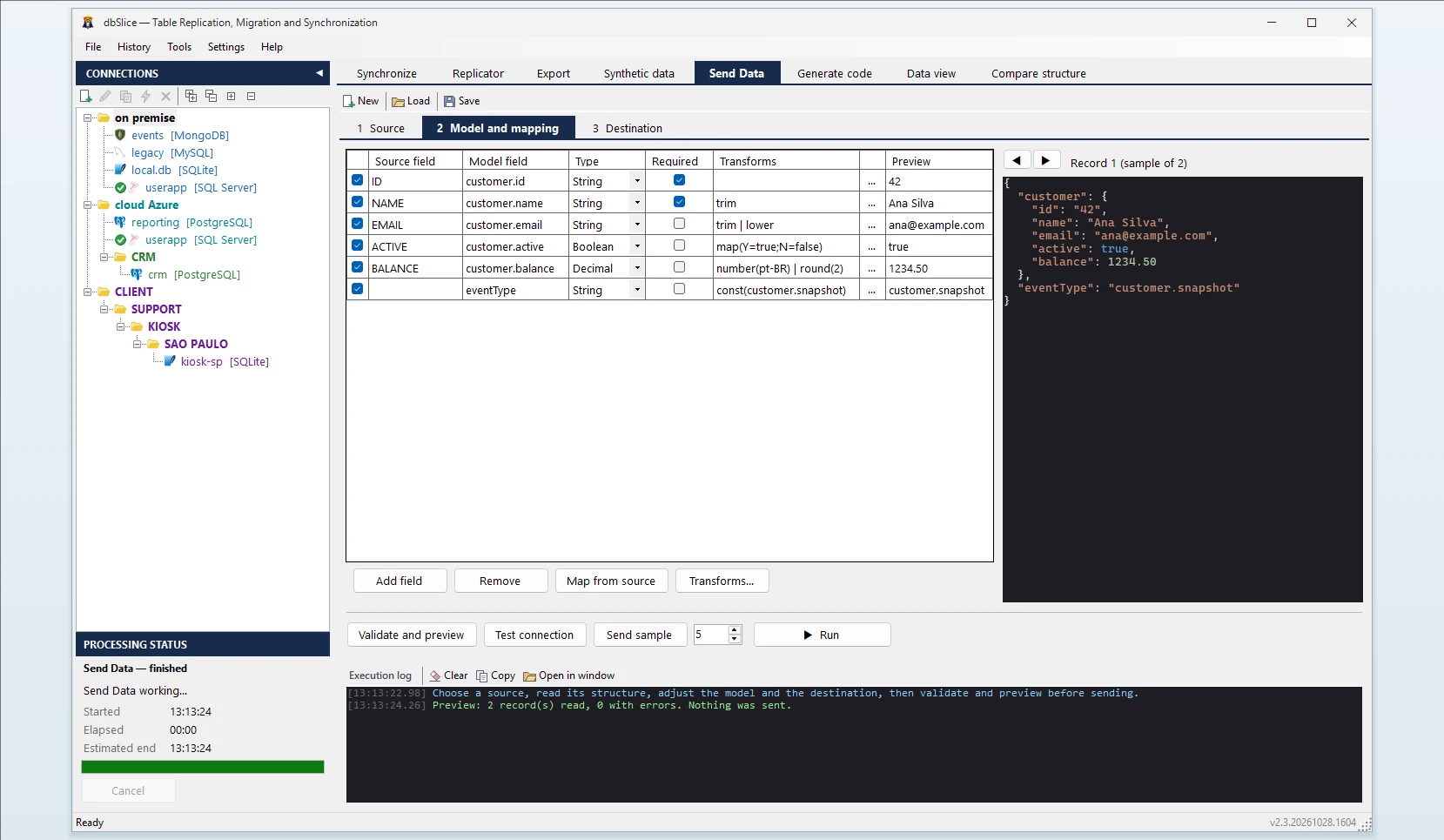
dbSlice Send Data tab

Shape the message, then look before you send

  • Map fields from the source to the JSON you need, including nested objects (customer.name).
  • Clean values on the way: trim, change case, replace, fixed values, number and date formats, value maps, masking and hashing for sensitive fields. No scripts to write.
  • Preview builds the JSON for the first records without sending anything and shows which records would fail and why.
  • Send a sample of a few records to check the destination, then run the rest.

Know what happened to every record

Each record ends in one of these states, so you can tell a rejection from a timeout:

StateMeaning
ConfirmedThe destination acknowledged it
RejectedThe destination refused it (for example HTTP 400, or no queue to route to)
UnknownSent, but no confirmation arrived; it may have been delivered
InvalidFailed your mapping rules; not sent

Failed records are listed in a file with their number and reason, without the record content, and every run is kept in the history.

Run it again tomorrow

Save the definition and run it from the CLI or Windows Task Scheduler. Credentials are stored protected for your Windows user, not in clear text.

What it is not

  • Not exactly-once. There is no transaction between the database and the broker. Running the same definition again sends the records again, and an interrupted run starts over from the beginning. Design the consumer to handle duplicates (an idempotent key is usually enough).
  • Not change data capture. It sends the rows you select when you run it; it does not stream changes as they happen. Use a WHERE filter (for example updated_at > …) for recurring runs.
  • No Schema Registry. Messages are plain JSON in UTF-8; Avro and Protobuf with a registry are not supported.
  • Produce only. It does not consume from topics or queues.

Part of data coexistence →

Try it on your own data: the free Microsoft Store version needs no license key.

Try free on the Microsoft Store ↗Buy dbSlice

Related guides

  • Test data that looks like production, without your customers in it
  • Keep data in step while your systems coexist
  • Tell your apps about every row you write
dbSlice®

Professional data synchronization, migration and reconciliation — for Windows and Linux (Docker).

A Thinwork product

Product

Product Pricing Guides Linux (Docker) Release notes Free version (Microsoft Store) Support FAQ Renew maintenance CLI examples

Legal

Terms of Use Privacy Policy Refund Policy EULA

Company

THINWORK TECNOLOGIA DA INFORMACAO - LTDA
CNPJ 09.166.605/0001-21
Since 2007

Av. Paulista, 1471, Conj. 511, Anexo CP 1722
Bela Vista, São Paulo - SP, 01311-927, Brazil

Sales

+55 (11) 5197-7969 [email protected]

Support hours: Mon–Fri, 9:00–17:00 (UTC−3)

github.com/thinwork Follow @dbsliceapp
© 2026 dbSlice®. All rights reserved. Windows x64 · GUI + CLI · Linux (Docker) · Web

dbSlice® and the dbSlice pizza mascot logo are registered trademarks of Thinwork Tecnologia da Informação Ltda. with the Brazilian National Institute of Industrial Property (INPI).

All other product names, logos and brands are the property of their respective owners and appear here only to identify the systems dbSlice works with. dbSlice is an independent product, not affiliated with, sponsored or endorsed by them. Learn more