
dbSlice or pgloader?
pgloader is a free, solid command-line loader, and for a one-time load run by someone comfortable with its configuration language it is a good choice. dbSlice is for teams that want:
- a Windows GUI with a preview of the data, a key-by-key diff and on-screen checks before writing;
- repeated runs: Upsert or new-rows-only syncs every night until cutover, not a single load;
- the same tool for other pairs (SQL Server, Oracle, Firebird, SQLite, InterSystems IRIS);
- masking on the way for development and test copies.
Both move data. Neither converts stored procedures, triggers or views.
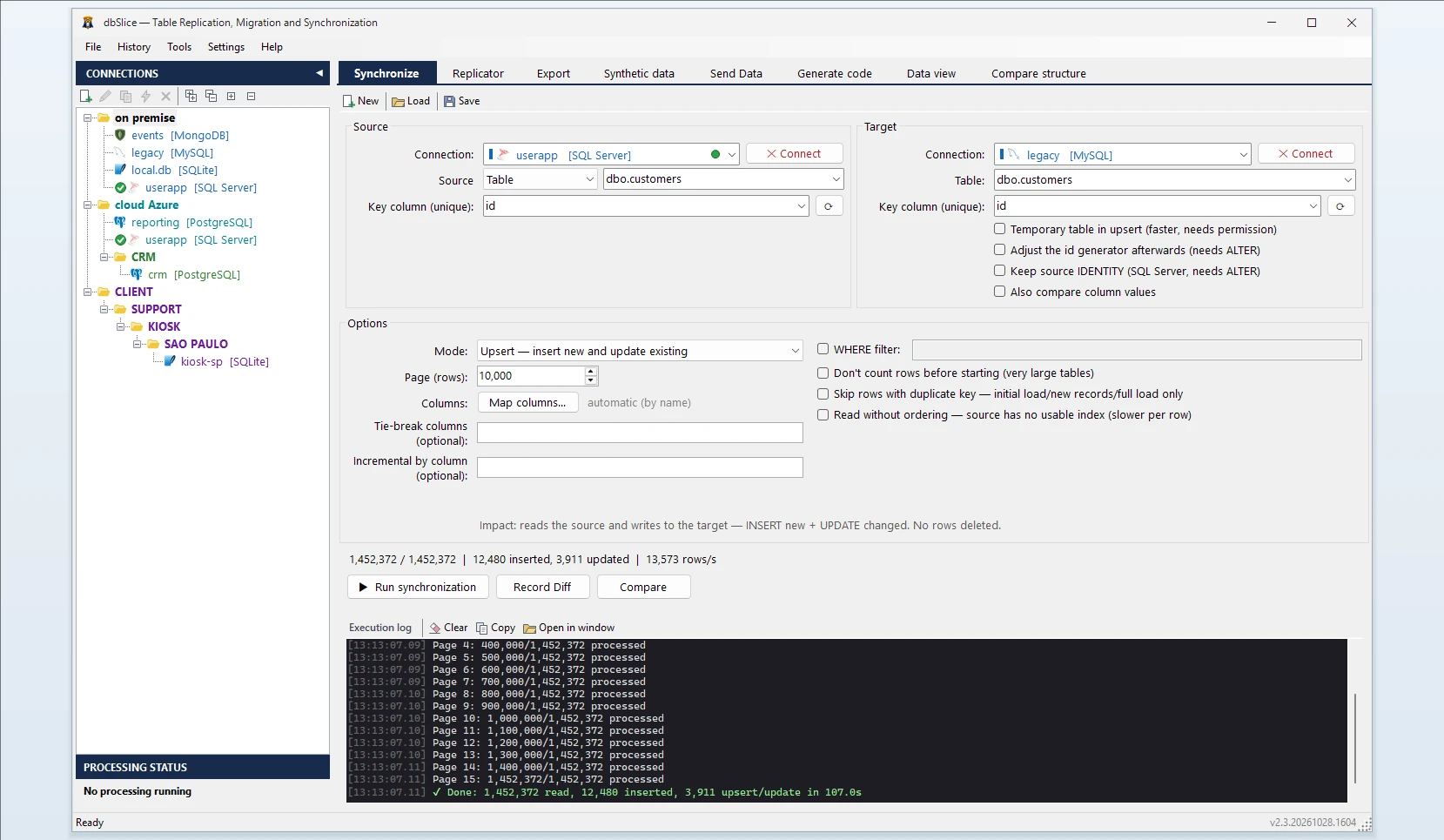
What dbSlice does
- Connects to MySQL and MariaDB with nothing extra to install.
- Reads in small batches, so the live database keeps serving its users.
- Writes to PostgreSQL in bulk for initial and full loads.
- Shows the target DDL. If the PostgreSQL table does not exist, dbSlice stops before writing and shows a
CREATE TABLEtranslated from MySQL for your DBA to review and run. It does not create objects in your databases by itself. - Keeps ids safe. After rows are copied with their
AUTO_INCREMENTids, the PostgreSQL sequence can be behind the highest id. dbSlice warns and shows the command to move it forward.
How column types are suggested
When the PostgreSQL table does not exist, dbSlice shows a CREATE TABLE for your DBA to review. This is the translation it suggests today:
| MySQL / MariaDB | Suggested in PostgreSQL | Review before running |
|---|---|---|
TINYINT, SMALLINT | SMALLINT | TINYINT(1) flags: change to BOOLEAN |
INT, MEDIUMINT | INTEGER | INT UNSIGNED: change to BIGINT |
BIGINT | BIGINT | BIGINT UNSIGNED: change to NUMERIC(20) |
BIT, BOOL | BOOLEAN | — |
DECIMAL(p,s) | NUMERIC(p,s) | — |
FLOAT, DOUBLE | DOUBLE PRECISION | — |
DATETIME, TIMESTAMP | TIMESTAMP | Add WITH TIME ZONE if your app expects it |
DATE, TIME | DATE, TIME | Zero dates: see below |
CHAR(n), VARCHAR(n) | VARCHAR(n) | CHAR padding is not kept |
TINYTEXT … LONGTEXT | TEXT | — |
BINARY, VARBINARY, BLOB | BYTEA | — |
JSON | JSONB | — |
ENUM, SET, YEAR, spatial types | TEXT | Add a CHECK, an enum type, or SMALLINT for YEAR |
It is a starting point, not a final schema: keys, indexes and constraints are yours to add.
Four MySQL details to plan for
1. Unsigned integers. PostgreSQL has no unsigned types, and the suggested DDL does not mark them. Before running it, widen the columns that are unsigned in MySQL: INT UNSIGNED → BIGINT, BIGINT UNSIGNED → NUMERIC(20). Otherwise the largest values will not fit.
2. TINYINT(1) booleans. They are suggested as SMALLINT and arrive as 0 and 1. If they are flags, declare them BOOLEAN in the CREATE TABLE; dbSlice converts 0/1 into false/true when the target column is boolean.
3. Zero dates. MySQL can hold 0000-00-00, which PostgreSQL rejects. Use a SELECT as the source and turn them into NULL, for example SELECT id, NULLIF(created_at, '0000-00-00 00:00:00') AS created_at, … FROM orders.
4. ENUM, SET and YEAR. They are suggested as TEXT. Keep it, or add a CHECK constraint or a PostgreSQL enum type yourself; YEAR is usually better as SMALLINT.
Common errors and what they mean
date/time field value out of range: 0000-00-00— a zero date. Use a SELECT source withNULLIF, as above.value out of range for type integer— anINT UNSIGNEDvalue above 2,147,483,647. Widen the column toBIGINT.duplicate key value violates unique constraint … _pkeyafter the copy — the sequence is behind the highest id. Run the command dbSlice shows, or tick "Adjust the id generator afterwards" before the run if your user is allowed to change the sequence.invalid byte sequence for encoding UTF8— the MySQL column holds text in another charset (often latin1 stored as utf8). dbSlice copies text as the MySQL driver returns it; it does not repair text that was stored in the wrong charset. Fix the source column, or read it through a SELECT withCONVERT.
Step by step
- Connect to MySQL or MariaDB and to PostgreSQL.
- Pick the source table (or a SELECT, as in the zero-date example) and the target table.
- Choose the key column used to match rows.
- Choose the mode: Initial load the first time, then Upsert or Insert new.
- Check before writing: Record Diff compares keys on both sides.
- Run it, or save it as a job and schedule it from the CLI. The Replicator copies a list of tables in one run, parents before children.
Keep both in sync until cutover
Schedule an Upsert job every night. With a column that only grows (updated_at or the AUTO_INCREMENT id), each run reads only the rows above the last value it saw. Deletes in MySQL are not detected by incremental runs, so plan a full comparison or a reload before the switch.
FAQ
Does dbSlice convert stored procedures, triggers or views?
No. It moves data. Convert code by hand or with a converter, then use dbSlice for the data and the sync until cutover.
Can I keep MySQL running while I migrate?
Yes. dbSlice reads in small batches, and nightly Upsert or new-rows-only runs keep PostgreSQL close to MySQL until you switch.
Does it create the tables in PostgreSQL?
Not by default. It stops before writing and shows a CREATE TABLE for your DBA to review and run.
What about deleted rows?
Incremental runs do not see deletes. Plan a full comparison (Record Diff) or a reload before the switch.
Can I try it before buying?
Yes. The free Microsoft Store version needs no license key; writing to a target database needs a Desktop or Server license.
Also works for
MySQL or MariaDB to SQL Server, Oracle, Firebird, SQLite or InterSystems IRIS, and PostgreSQL back into MySQL. See also SQL Server to MySQL, Firebird to PostgreSQL and Oracle to PostgreSQL.