
dbSlice or MySQL Workbench?
MySQL Workbench has a free migration wizard that reads SQL Server, and for a one-time move it is worth trying. dbSlice is for teams that need repeated runs (Upsert or new-rows-only every night until cutover), a key-by-key diff and on-screen checks before writing, masking for test copies, and the same tool for other pairs. Neither converts T-SQL procedures or triggers to MySQL; plan that part separately.
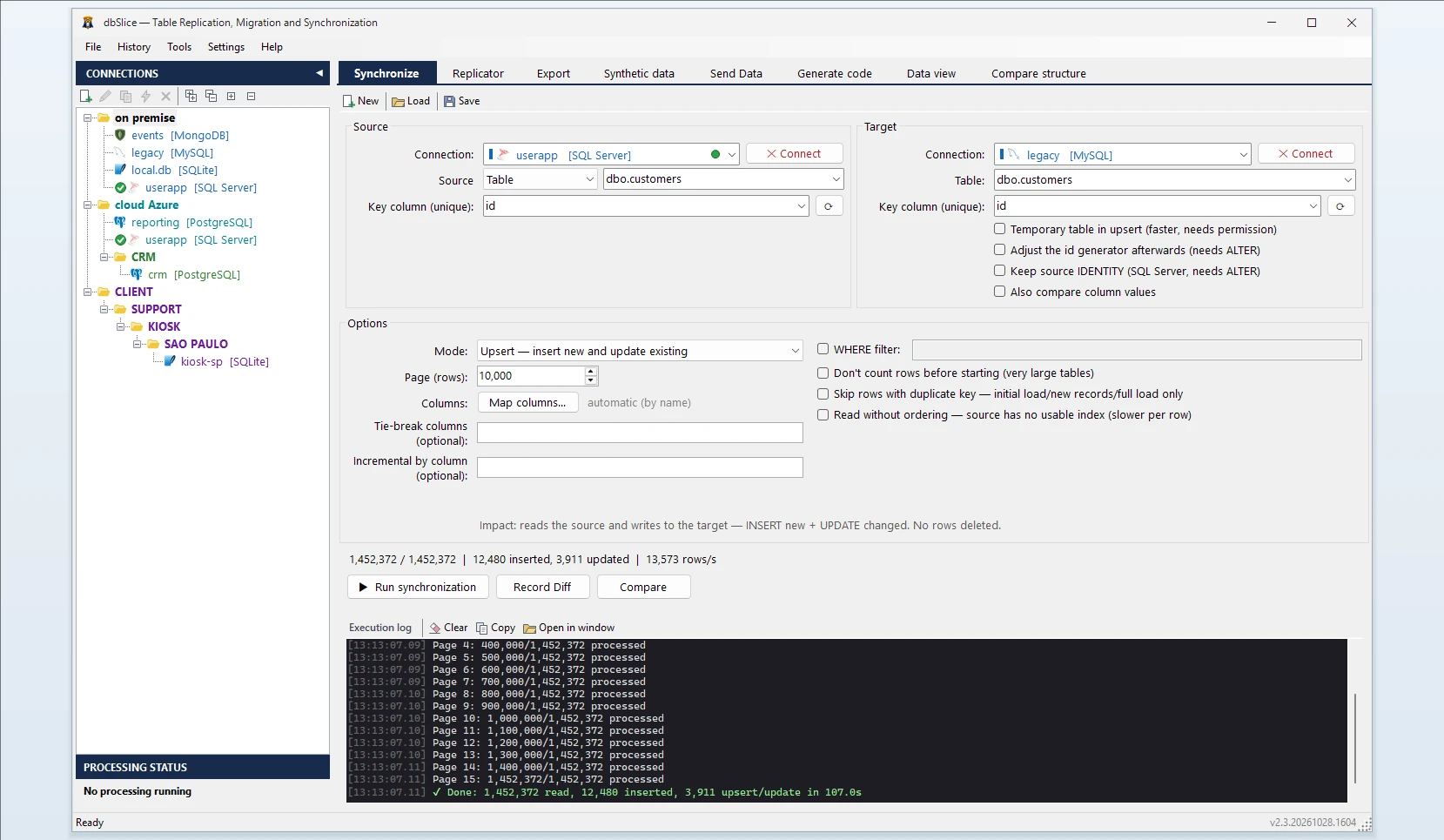
What dbSlice does
- Reads SQL Server in small batches, so the live database keeps serving its users.
- Writes to MySQL and MariaDB. Initial and full loads are faster when your DBA enables
local_infileon the server and you allow it in the connection; without it they still work, only slower. - Shows the target DDL. If the MySQL table does not exist, dbSlice stops before writing and shows a
CREATE TABLEtranslated from SQL Server for your DBA to review and run. It does not create objects in your databases by itself. - Keeps your ids. Rows arrive with their original
IDENTITYvalues. MySQL's InnoDB moves the table'sAUTO_INCREMENTpast the highest id inserted, so new rows created by the application after the copy do not collide.
SQL Server details to plan for
| SQL Server | Suggested in MySQL | Check |
|---|---|---|
datetimeoffset | DATETIME(6) | The offset is not kept. Convert to UTC in a SELECT source if the zone matters |
datetime2(7) | DATETIME(6) | MySQL keeps microseconds; the 7th digit is dropped |
uniqueidentifier | CHAR(36) | Stored as text; fine for joins, larger than BINARY(16) |
nvarchar(max), varchar over 16,383 | LONGTEXT | Expected; index only a prefix if needed |
bit | TINYINT(1) | MySQL's usual boolean |
varbinary, image | LONGBLOB | Expected |
tinyint, smallint, int, bigint | SMALLINT, SMALLINT, INT, BIGINT | Same ranges; tinyint gets a wider type |
decimal(p,s), money, smallmoney | DECIMAL(p,s) | money arrives as DECIMAL(19,4) |
float, real | DOUBLE | — |
char(n), nchar(n) | VARCHAR(n) | Trailing-space padding is not kept |
time(7) | TIME | MySQL TIME keeps whole seconds; change to TIME(6) if you need fractions |
text, ntext, xml | LONGTEXT | XML arrives as plain text |
timestamp / rowversion | LONGBLOB (from version 2.3.20261030.1528) | Copied as bytes. They are SQL Server's row versions, so most targets don't need them: you can leave the column out of the copy |
sql_variant, hierarchyid, geography, geometry | LONGTEXT | Convert in a SELECT source (for example .ToString() or CAST) if you need the value |
Two settings on the MySQL side:
- Character set. Create the MySQL database (or the tables) with
utf8mb4. With an olderlatin1default, characters outside it fail or turn into?. - Table name case. On Linux, MySQL table names are case-sensitive by default. Pick a convention (usually lower case) in the
CREATE TABLEand keep it; dbSlice matches columns by name without case.
Common errors and what they mean
Incorrect string value: '\xF0\x9F…' for column …— the MySQL table is notutf8mb4. Recreate it (or the database) withutf8mb4, as above.Data too long for column …— the target column is shorter than the data, often aVARCHARdeclared by hand. Widen it or switch toLONGTEXT.Row size too large (> 8126)— many wideVARCHARcolumns in one InnoDB row. Turn the largest ones intoTEXTorLONGTEXTin theCREATE TABLE.Loading local data is disabled—local_infileis off on the server or in the connection. The load still runs without it, only slower; ask your DBA if you want the faster path.Duplicate entry … for key 'PRIMARY'— the row is already in MySQL. Use Upsert or Insert new instead of Initial load for repeated runs.
Step by step
- Connect to SQL Server and to MySQL or MariaDB.
- Pick the source table or a SELECT, and the target table.
- Choose the key column used to match rows.
- Choose the mode: Initial load the first time, then Upsert or Insert new.
- Check before writing: Record Diff compares keys on both sides.
- Run it, or save it as a job and schedule it from the CLI. The Replicator copies a list of tables in one run, parents before children.
Keep both in sync until cutover
Schedule an Upsert job every night. With a column that only grows (an updated_at or the IDENTITY id), each run reads only rows above the last value it saw. Deletes in SQL Server are not detected by incremental runs, so plan a full comparison or a reload before the switch.
FAQ
Does dbSlice convert T-SQL stored procedures or triggers?
No. It moves data. Rewrite procedures and triggers for MySQL separately, then use dbSlice for the data and the sync until cutover.
Can SQL Server keep running during the migration?
Yes. dbSlice reads in small batches, and nightly Upsert or new-rows-only runs keep MySQL close to SQL Server until you switch.
Does it create the tables in MySQL?
Not by default. It stops before writing and shows a CREATE TABLE for your DBA to review and run.
MySQL or MariaDB?
Both. dbSlice connects to either with nothing extra to install.
Can I try it before buying?
Yes. The free Microsoft Store version needs no license key; writing to a target database needs a Desktop or Server license.
Also works for
SQL Server to PostgreSQL (sync guide), Oracle, Firebird, SQLite or InterSystems IRIS, and MySQL back into SQL Server.