The license is usually the smallest line in a data migration budget. What moves the total is how many products you need to cover your databases, who runs the refreshes after cutover, and what happens in year two when the tool needs updates and the job still has to run every night.
This guide walks through the pricing models, what dbSlice costs, and the costs that rarely appear on a price page.
The four pricing models
- Free and open source. Tools such as pgloader cost nothing to download. The cost is the time to script, run, monitor and support the process yourself.
- Perpetual license. You pay once and keep using the version you bought. Updates and support after the first period usually need a maintenance plan.
- Subscription. You pay for as long as you use it. A two-week migration and a three-year coexistence lead to very different totals.
- Usage billing. Cloud services such as AWS DMS charge by capacity and hours, plus the services around them.
Per pair or one license?
Before comparing prices, count your database pairs. A license that covers only SQL Server and PostgreSQL is cheap until the next project brings Oracle, MySQL or a legacy Firebird or Caché system.
dbSlice is one app with one license for all the leading databases it supports: SQL Server, PostgreSQL, Oracle, MySQL, MariaDB, Firebird, SQLite and InterSystems Caché and IRIS, each as source or target. The published prices and license terms of other tools are compared on their own pages: DBConvert, Full Convert, SQLines and EMS Data Pump.
What dbSlice costs
Launch prices, in US dollars before taxes, as published on the pricing table:
| Edition | Launch price | Regular price | Covers |
|---|---|---|---|
| Desktop | US$89.99 | US$149.99 | 1 named user, 1 activated device (Windows 10/11) |
| Windows Server | US$199.00 | US$299.00 | 1 Windows Server installation |
| Linux Server (Docker) | US$299.00 | US$399.00 | 1 Linux server, multiple Docker instances; sold through our team |
- One-time payment, perpetual license, with 12 months of updates and standard support.
- 14-day money-back guarantee on Desktop and Windows Server.
- Optional maintenance after year one: US$75/year for Desktop and US$150/year for Windows Server. For the Linux edition, the terms come with the proposal.
Year two: what maintenance actually buys
Without maintenance, the program keeps working on the version you installed. New versions and the command line require active maintenance (FAQ). That decides the plan:
- One migration, run from the screen, then done: the initial purchase can be enough.
- Jobs on a scheduler (nightly refreshes, coexistence, test copies): keep maintenance active, because the command line needs it and new database versions arrive as updates.
License and maintenance over three years, at today's prices:
| Scenario | Desktop | Windows Server |
|---|---|---|
| Screen use only, no renewal | US$89.99 | US$199.00 |
| Scheduled jobs, maintenance renewed in years 2 and 3 | US$239.99 | US$499.00 |
Taxes, infrastructure and team time are not included, and prices can change.
The costs nobody quotes
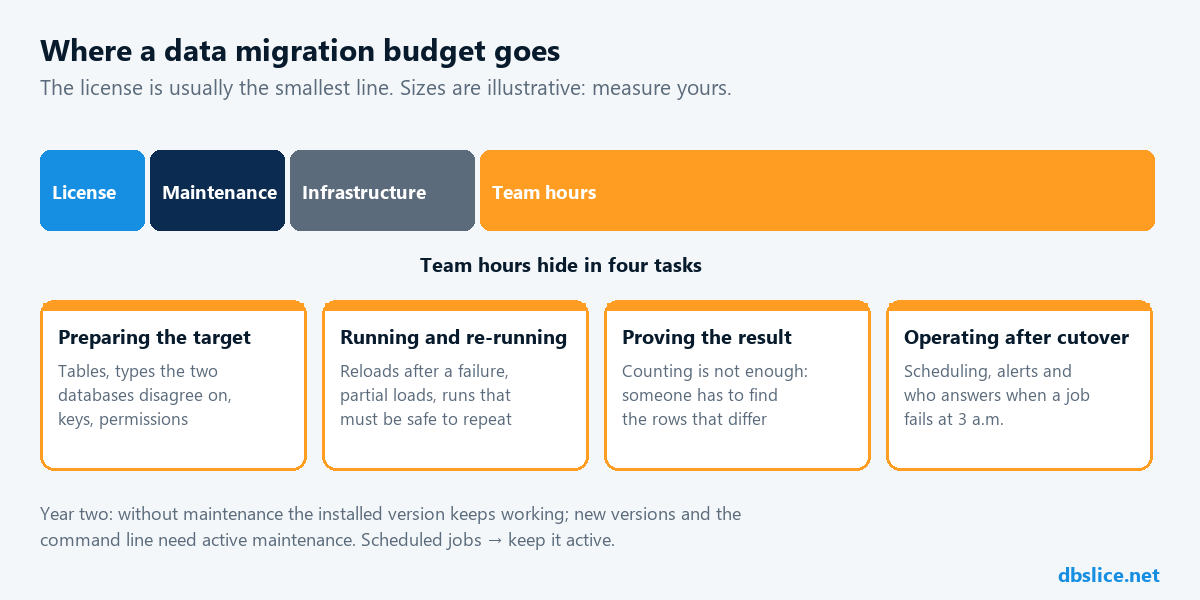
Total cost = license + maintenance + infrastructure + team hours + validation and fixes.
The team hours are usually the largest part, and they hide in these tasks:
- Preparing the target: tables, types the two databases disagree on, keys and permissions.
- Running and re-running: reloads after a failure, partial loads, runs that must be safe to repeat.
- Proving the result: counting is not enough; someone has to find the rows that differ.
- Operating after cutover: scheduling, alerts and the person who answers when a job fails at 3 a.m.
A tool earns its price when it removes hours from that list. In dbSlice, Record Diff and Compare with the full list of divergent keys cut the validation step, and saved jobs with alerts cut the operating step.
Put your own numbers in
Skip vendor ROI promises, including ours. In your proof of concept, write down:
- Hours to set up one representative table and run the first load.
- Hours to find and fix the rows that did not match.
- Hours to turn the run into a scheduled job with alerts.
- Your team's loaded hourly cost.
Do the same with your current script or tool, and compare the totals against the license line.
FAQ
- Is maintenance mandatory? No. Without it, the installed version keeps working. New versions and the command line need active maintenance.
- Can I test before paying? Yes. The free version on the Microsoft Store connects, browses, compares and exports to CSV. Writing to a target needs a license, covered by the 14-day money-back guarantee. Qualified companies can also ask for a full time-limited evaluation.
- Is a free tool ever the better choice? Yes, when it covers your pairs and your team can run and support it. Count the hours, not just the price.
For the technical side of the choice, read best data migration tool for teams that work across databases.
Planning a system replacement and need help designing the coexistence? Thinwork can run the project with you.