
Updated November 8, 2026 · Thinwork, the team behind dbSlice. dbSlice is our product; the other tools are described from their own sites.
Quick answer
- A free, one-time migration with a wizard: MySQL Workbench's Migration Wizard. It reads SQL Server and moves tables and data.
- You are moving to AWS and want ongoing replication of changes: AWS DMS.
- A free desktop tool for an occasional table copy: DBeaver Community.
- Stored procedures, functions and views converted to MySQL: a code conversion tool such as SQLines SQL Converter, or a conversion workstream. Pair it with a data tool.
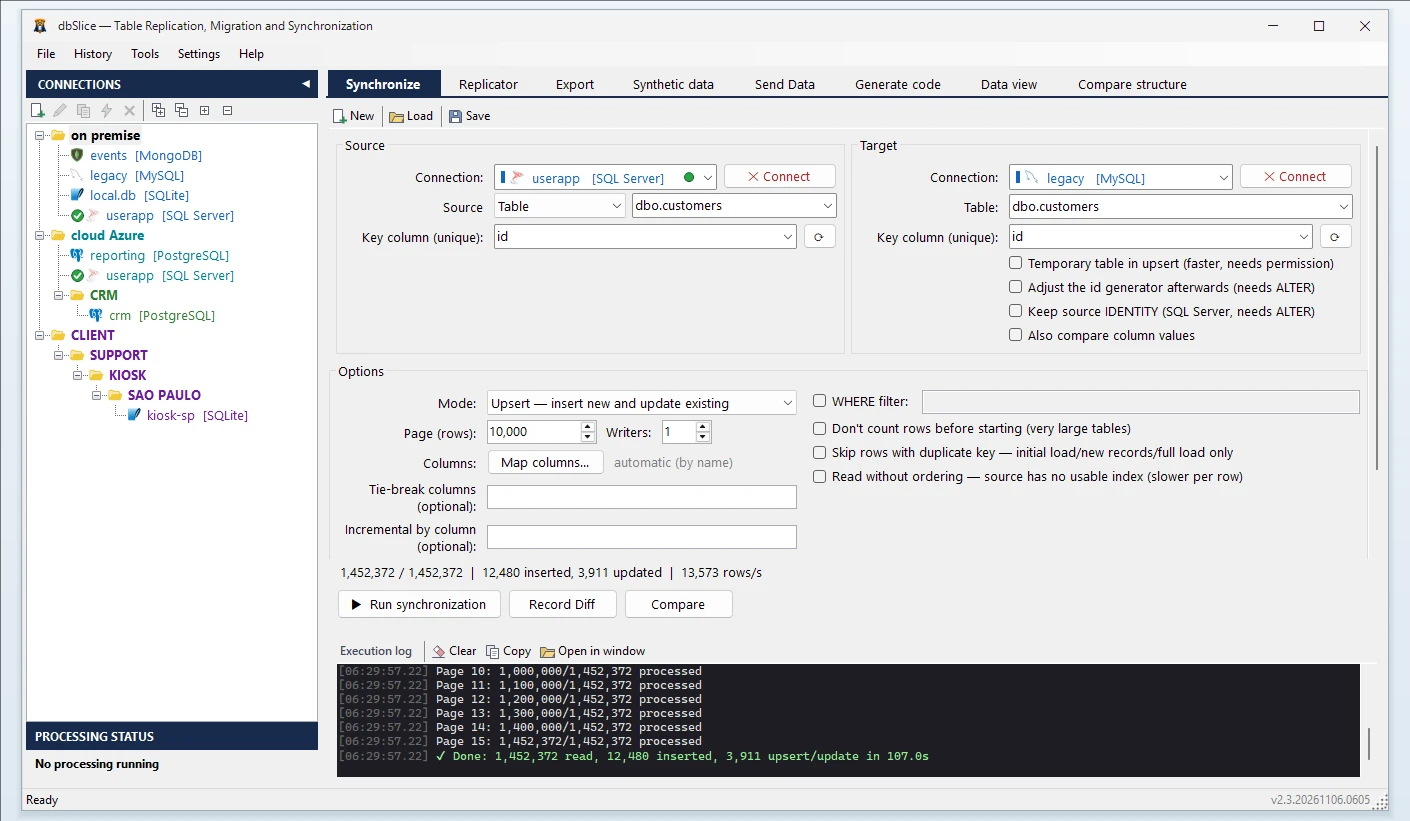
- The data moved, then kept in sync until cutover, and both sides compared key by key before the switch, from a Windows app or the command line: dbSlice.
Who should pick what
| If you… | Pick | Why |
|---|---|---|
| Want free, from the MySQL team, for a one-time move | MySQL Workbench | Its Migration Wizard supports Microsoft SQL Server 2000 and later as a source; the docs say tables and their data are converted automatically, while views, stored procedures and triggers are not (checked Nov 8, 2026) |
| Are migrating into AWS and need changes replicated while you test | AWS DMS | Takes SQL Server sources and MySQL-compatible targets, runs in the AWS Cloud, does one-time migrations or ongoing replication; schema conversion is a separate service; pay as you go, by the hour (checked Nov 8, 2026) |
| Already use DBeaver and need an occasional copy | DBeaver Community | The free edition has a data transfer wizard that copies tables between databases. DBeaver lists data migration, table data comparison and a task scheduler in its Enterprise (US$ 255/year) and Ultimate (US$ 510/year) editions (checked Nov 8, 2026). DBeaver vs dbSlice → |
| Want a dedicated tool for this one pair | DBConvert | DBConvert for MSSQL & MySQL converts and syncs the pair, from US$ 199; DBConvert Studio, for all its database types with scheduling and trigger-based sync, from US$ 699 (checked Nov 8, 2026) |
| Need many source types, including files and older databases, with a large budget | Full Convert | Lists SQL Server and MySQL; plans from US$ 999 a year (Pro), perpetual from US$ 1,999 (checked Nov 8, 2026) |
| Need T-SQL converted as well as data moved | SQLines | Publishes a SQL Server to MySQL path; one perpetual license covers SQLines Data and SQLines SQL Converter: US$ 495 (checked Nov 8, 2026) |
| Need the target kept in sync for weeks or months and proof that both sides match | dbSlice | Initial load, then Upsert, New rows only, Update existing only or incremental by column, in batch, on demand or on a schedule; key-by-key compare with the list of divergent keys saved to a file; from US$ 89.99 perpetual (launch price) |
Microsoft's SQL Server Migration Assistant (SSMA) works the other way: it moves databases into SQL Server and Azure SQL. It does not target MySQL (checked Oct 30, 2026).
Side by side
| MySQL Workbench | AWS DMS | DBeaver | DBConvert | Full Convert | SQLines | dbSlice | |
|---|---|---|---|---|---|---|---|
| Where it runs | Desktop app | AWS Cloud | Desktop app | Desktop app | Desktop app | Desktop and command line | Windows app and CLI; Linux edition in Docker |
| Converts procedures and views | Retrieved and shown for manual conversion | Separate service | Not covered on this page | Not covered on this page | Not covered on this page | Yes (SQL Converter) | No |
| Keeps the target in sync after the first load | Not covered on this page | Ongoing replication | Scheduled tasks in paid editions | Sync in the pair product; trigger-based sync and scheduling in Studio | Replication (Pro) | Not covered on this page | Upsert, new-only, update-only, incremental by column (batch, on demand or scheduled) |
| Compares source and target data | Not covered on this page | Data validation | Table data comparison in paid editions | Not covered on this page | Table comparison (Pro) | Not covered on this page | Key by key, full list of divergent keys |
| Entry price | Free | By the hour | Free (Community) | US$ 199 per pair | US$ 999/year | US$ 495 | US$ 89.99 perpetual (launch price) |
| Checked on | Nov 8 | Nov 8 | Nov 8 | Nov 8 | Nov 8 | Nov 8 | Nov 8 |
"Not covered on this page" means we did not find it on the vendor's site when we checked. It does not mean the tool cannot do it.
The honest con about dbSlice
- dbSlice moves data. It does not convert stored procedures, triggers or views. It shows the MySQL DDL for a missing table instead of creating it on its own.
- It runs batch jobs, not real-time replication. Incremental runs do not see rows deleted at the source, so run Compare or a reload before the switch.
- It is a Windows app with a command line. The Linux edition runs in Docker on your own infrastructure.
If any of those is a deal-breaker, pick one of the tools above, or pair one of them with dbSlice.
How teams combine them
- Code: convert T-SQL procedures and views with a code conversion tool.
- Data: run the initial load with dbSlice, then keep MySQL in sync every night while the SQL Server application is still running.
- Before cutover: run Compare key by key and re-sync only the divergent keys. Then switch.
See the full walkthrough: data migration from SQL Server to MySQL.
Moving to PostgreSQL instead? See the SQL Server to PostgreSQL tools.
In one dbSlice license: migrate · keep in sync on a schedule · CLI jobs · compare key by key · masking with keys and foreign keys preserved · synthetic test data for DEV and QA
FAQ
What is the best free tool to migrate SQL Server to MySQL?
For a one-time move, MySQL Workbench's Migration Wizard, which reads SQL Server and moves tables and data. DBeaver Community, also free, copies tables between databases from its data transfer wizard.
Will my stored procedures come across?
Not automatically with most data tools. MySQL Workbench shows code objects for manual conversion; SQLines SQL Converter converts T-SQL; dbSlice moves data only.
Which tool keeps SQL Server and MySQL in sync until cutover?
AWS DMS replicates changes when you migrate into AWS. dbSlice re-runs Upsert or incremental syncs on a schedule, from a Windows app, the command line or its Linux edition, on your own machines.
Can I try dbSlice before buying?
Yes. The free version on the Microsoft Store connects, browses data, compares structures and exports to CSV. Writing to a target needs a Desktop or Server license, with a 14-day money-back guarantee.
Planning a system replacement and need help designing the coexistence? Thinwork can run the project with you.