The best data migration tool is the one that covers your database pairs, keeps working after the first load and proves the target matches the source before anyone switches over. Speed matters, but most migrations fail on a type nobody checked, a row that went missing or a refresh that only one person knew how to run.
If your team moves data between SQL Server, PostgreSQL, Oracle, MySQL, MariaDB, Firebird, SQLite or InterSystems Caché and IRIS, five criteria separate the tools. Here is each one, and what dbSlice shows you on screen for it.
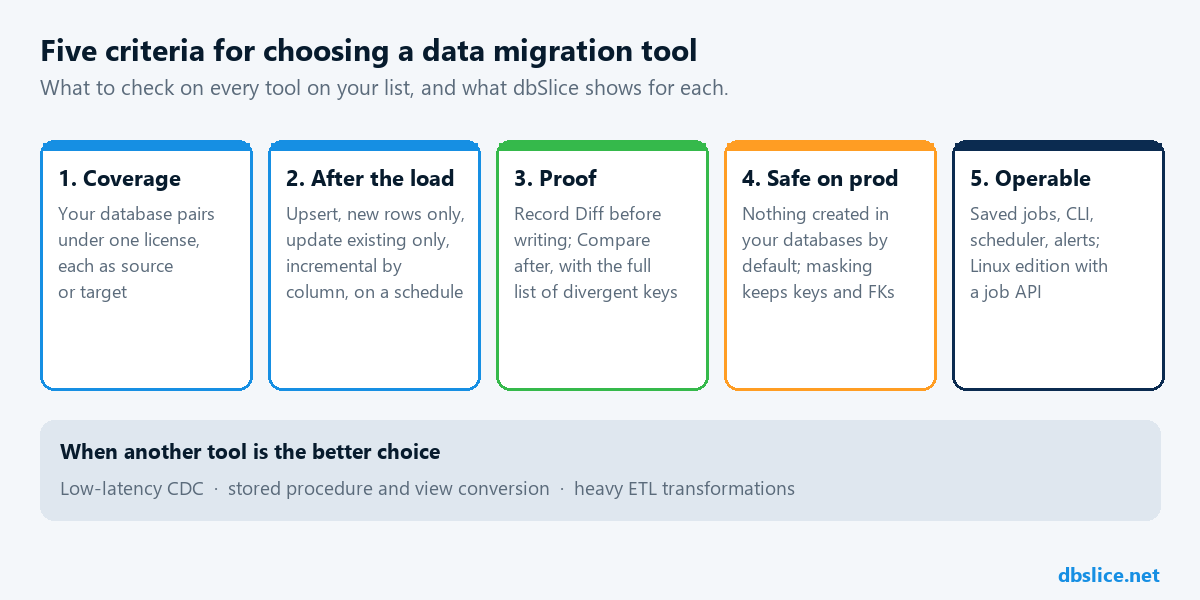
1. Coverage of your database pairs, under one license
Write down the pairs you actually use this year and next: SQL Server to PostgreSQL, Oracle to SQL Server, MySQL to PostgreSQL, a Firebird or Caché system that has to be retired, or a job where you convert a table from SQL Server to MySQL. Then check what each tool charges to cover all of them.
Many tools are sold per pair or per edition, so a second project means a second purchase. dbSlice is one app with one license for all the leading databases it supports, each one as source or target, and new databases arrive as regular updates. The comparisons with DBConvert, Full Convert, SQLines and EMS Data Pump go through the details. To see what breaks in your own schema before you choose, run the free migration assessment.
2. Life after the initial load
The first copy is rarely the last. The old system keeps taking orders while the new one is tested, and a reporting or integration database needs a refresh every night.
Check whether the tool keeps the target current without a full reload. dbSlice runs Initial load once, then Upsert, New rows only, Update existing only or incremental by column (an updated_at or a sequence id, with a re-read window for late commits), on demand or on a schedule. The data coexistence guide shows the pattern for a system replacement that takes months.
3. Proof before and after writing
"The job finished" is not evidence. Two tables with the same row count can still hold different records.
- Before writing, Record Diff shows which rows would be inserted or updated.
- After writing, Compare checks source and target key by key and saves the full list of divergent keys to a file, so you re-sync only those rows. See compare source and target by key.
Ask every vendor on your list for the same thing: a list of the keys that differ, not a percentage.
For proof from production, with the conditions behind each number, see the anonymous customer stories.
4. Safe on production databases
A migration tool reads from the system that pays the bills. Check what it does there.
- By default, dbSlice creates nothing in your databases: no triggers, no tables, no agents. The source is read by key in small batches.
- Your data does not go to Thinwork. dbSlice runs on your Windows machine or server, or in your own Docker environment.
- Test copies can be masked in flight, with sensitive fields obfuscated and keys and foreign keys preserved. See masked staging copies.
5. Operable without a developer on call
After cutover, the person who runs the refresh is often a DBA or an SRE, not the person who built it.
- Every screen run can be saved as a job and run from the command line and a scheduler, with logs, exit codes and e-mail or webhook alerts.
- The Linux edition runs in Docker with a web interface, a built-in scheduler and a job API for CI/CD.
- When the target is not a database, the same app sends rows to a REST API, Kafka or RabbitMQ.
When another tool is the better choice
| You need | Look at |
|---|---|
| Changes on the target within seconds | Log-based CDC (for example Debezium) or the database's native replication |
| Stored procedures, triggers and views converted | A code conversion tool or workstream; dbSlice moves data, not code |
| A one-time load into PostgreSQL, scripted by your team | pgloader, which is free |
| Heavy business transformations and an analytical model | An ETL/ELT platform; dbSlice can handle the movement stage |
dbSlice runs batch jobs. Incremental runs do not see rows deleted at the source; run Compare or a reload before the switch.
About speed numbers
Thinwork has published one large run: 12.96 billion rows in about 41 hours (≈ 88,500 rows/s), a live production table with 40 columns and 9 indexes, with the network and both databases tuned for the load. It is our own measurement, not an independent benchmark. Your result depends on your row width, indexes, network and target, so read how to read a sync speed number and measure on your own tables. The conditions are on the performance page.
A proof of concept in one afternoon
- Pick one representative table with long text, nulls, dates and decimals.
- Run Initial load, then change a few source rows and run Upsert.
- Run Compare and open the list of divergent keys. It should be empty.
- Save the run as a job and start it from the command line.
- Note the hours your team spent, including checking the result.
FAQ
- Is dbSlice the best tool for every migration? No. It fits teams that move and keep data in sync across the leading databases. For low-latency CDC or code conversion, use a tool built for that.
- Can I try it before buying? Yes. The free version on the Microsoft Store connects, browses, compares and exports to CSV. Writing to a target needs a Desktop or Server license, which comes with a 14-day money-back guarantee.
- What does it cost? See data migration tool pricing and the pricing table.
Planning a system replacement and need help designing the coexistence? Thinwork can run the project with you.