
Need real rows instead of fake ones? →
A new environment is rarely useful while it is empty. Screens need rows to list, reports need values to add up, and a performance test needs volume. The quickest way to get that data is to copy it from production, and that is also the way that puts customer records in places where they should not be.
The Synthetic data tab offers another route. It reads the shape of a table, lets you choose a strategy for each column, and generates as many rows as the test needs. No source rows are copied: the values are produced by strategies you select.
This guide follows the Synthetic data tab and its Field mapping window in dbSlice 2.3. It explains the choices available for each column and how to produce a first data set carefully. Availability can vary by license.
1. Synthetic rows or a masked copy?
dbSlice supports both approaches, and they answer different needs.
| Approach | Where the values come from | Use it when |
|---|---|---|
| Synthetic data | Strategies chosen for each column. Nothing is read from existing rows, except the keys of referenced tables. | The environment is new, the real data may not leave its origin, or you need more rows than exist. |
| Masked synchronization | Real rows, with selected columns replaced before they are written. | Tests depend on real distributions, real relationships, and real edge cases. |
The masked route is described in Move the Right Data. Mask It Before It Arrives. The two can be combined: synchronize the reference tables that carry no personal data, and generate the tables that do.
2. Read the Synthetic data tab
The tab has two groups, Model and Output, above the action buttons and the execution log.
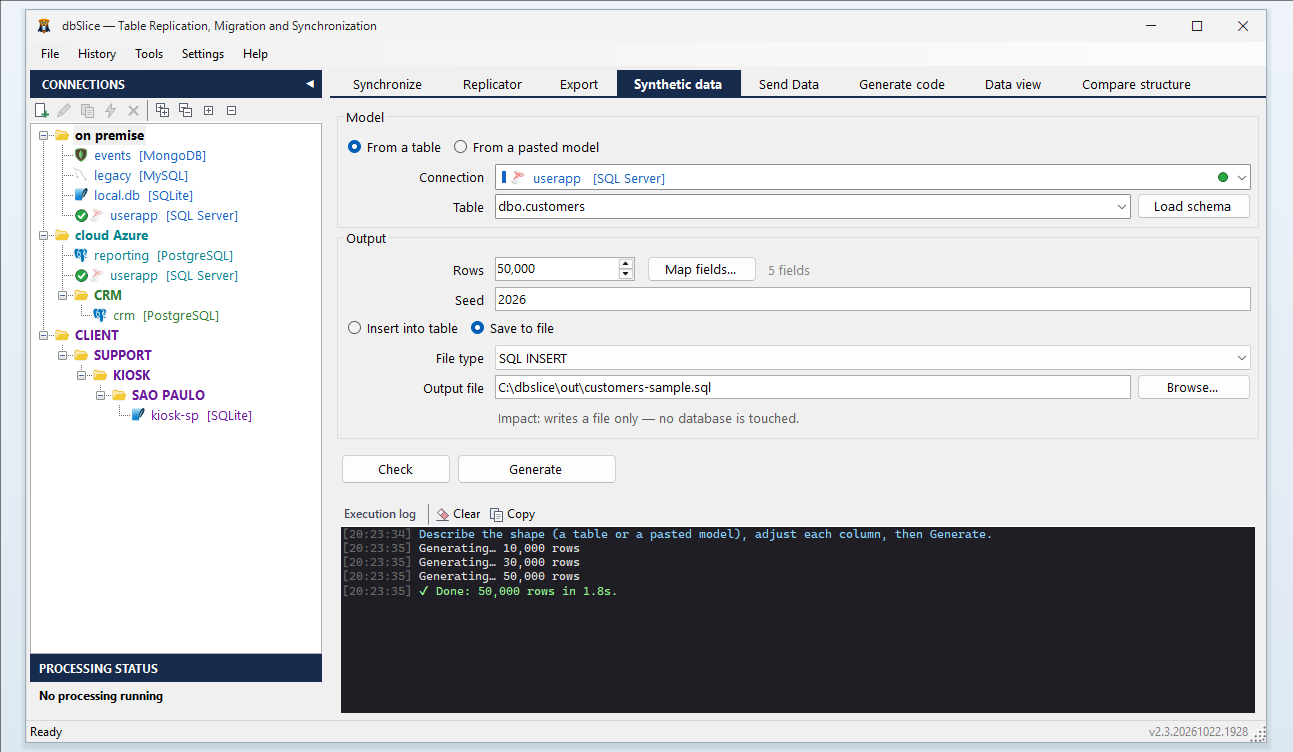
| Control | Purpose |
|---|---|
| From a table / From a pasted model | Where the shape of the data comes from. |
| Connection and Table | The saved connection and the table whose structure will be used. |
| Load schema | Reads the columns, their types, and the foreign keys of the table. |
| Rows | How many rows to generate, up to 5,000,000 per run. |
| Map fields... | Opens the field mapping, where each column receives a strategy. The label beside it shows how many fields were found. |
| Seed | An optional value that makes the generation repeatable. |
| Insert into table / Save to file | Whether the rows are written to a database table or to a file. |
| Check | Validates the plan without generating anything. |
| Save layout / Load layout | Store the plan in a .dgen.json file and open it again later. |
| Generate | Produces the rows and writes them to the chosen output. |
The log starts with a one-line summary of the whole procedure: describe the shape, adjust each column, then generate.
3. Describe the shape of the data
From a table
Choose a connection and a table, then Load schema. dbSlice reads the column names, the data types, whether each column accepts nulls, and the foreign keys. This is the usual choice when the rows will be inserted into that same table in another environment.
From a pasted model
When there is no table yet, the shape can come from a sample you paste: a JSON object, a JSON array, a CSV, or an XML fragment. dbSlice validates the structure and derives the fields from it. This is useful for producing a file for an API test or an import routine before the database exists.
4. Map each field to a strategy
Map fields... opens the Field mapping window, with one line per column. The Strategy chosen for each column is the central decision of the whole feature.
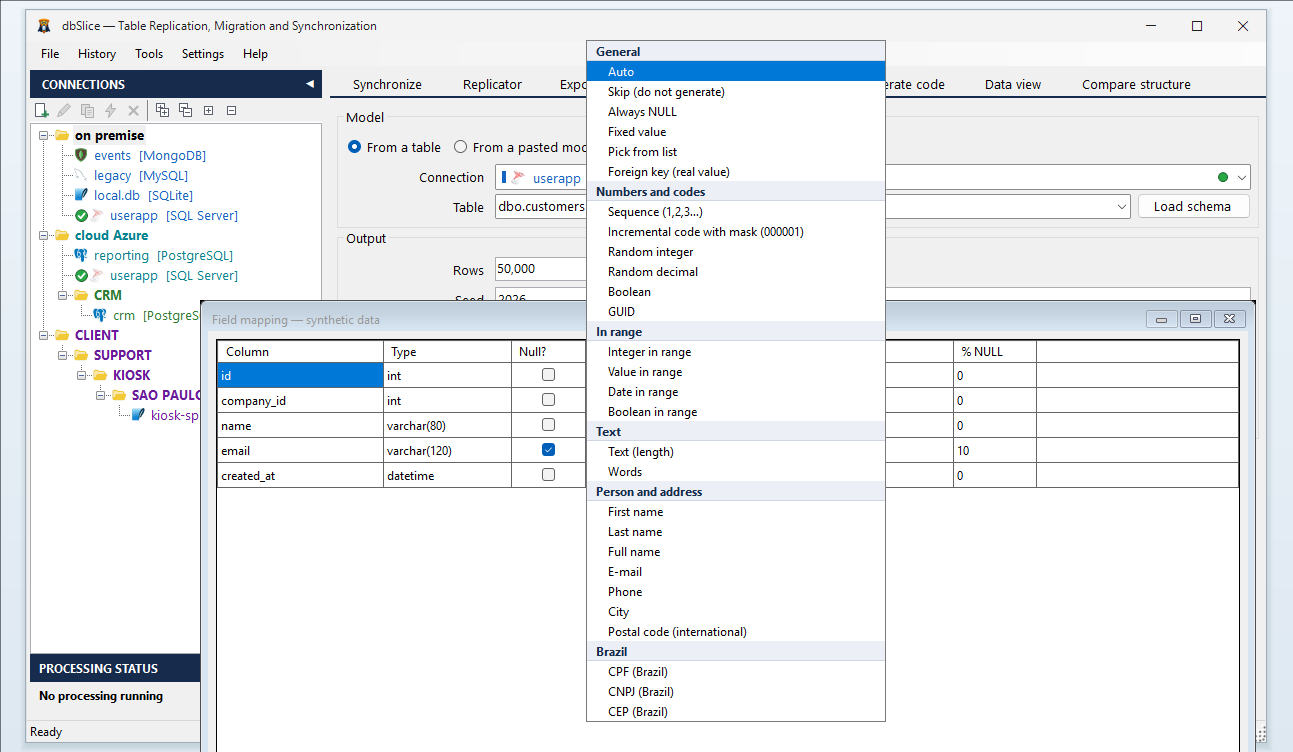
| Column of the grid | Purpose |
|---|---|
| Column | The column name read from the table or the model. |
| Type | The data type of the column, such as int, varchar, or datetime2. |
| Null? | Whether the column accepts nulls. |
| Strategy | How the values are produced, chosen from the list in the next section. |
| Options | Parameters for the strategy. When a strategy uses options, the grid fills in an example to edit. |
| % NULL | The share of rows, from 0 to 100, that receive a null. It applies only to columns that accept nulls. |
| (untitled last column) | Warnings and notes about the column, such as FK → company.id. |
The window has its own Check button, so the plan can be reviewed without leaving it.
5. The strategy catalog
The list has 28 strategies in six groups, organized by the kind of value produced.
| Group | Strategies | Typical use |
|---|---|---|
| General | Auto, Skip (do not generate), Always NULL, Fixed value, Pick from list, Foreign key (real value) | Let dbSlice decide from the column type, leave a column to the database default, repeat a constant, or draw from a short list such as status codes. |
| Numbers and codes | Sequence (1,2,3...), Incremental code with mask (000001), Random integer, Random decimal, Boolean, GUID | Identifiers, order numbers with a fixed width, quantities, amounts, and flags. |
| In range | Integer in range, Value in range, Date in range, Boolean in range | Values that must stay between two limits: an age, a price band, a period of dates. |
| Text | Text (length), Words | Descriptions, notes, and free-text columns. |
| Person and address | First name, Last name, Full name, E-mail, Phone, City, Postal code (international) | Customer, user, and contact tables. |
| Brazil | CPF (Brazil), CNPJ (Brazil), CEP (Brazil) | Tables that validate Brazilian tax identifiers and postal codes. |
Auto is the starting point for every column. It chooses from the column's type and name: a column whose name contains email receives e-mails, one named cnpj receives CNPJ numbers, an integer primary key receives a sequence, and an identity column is skipped. Replace it wherever the application gives the column a meaning the name does not reveal, such as a status column that must hold the statuses the application knows.
Options for each strategy
| Strategy | Options | Example |
|---|---|---|
| Integer in range, Value in range | min,max, required. Value in range produces a decimal that respects the column's precision and scale. | 1,1000 |
| Random integer, Random decimal | min,max, optional. | 0,500 |
| Incremental code with mask | A mask in which 9 is a digit and anything else is literal text. | 999999 gives 000001; ORD-9999 gives ORD-0001 |
| Boolean in range | true,false and an optional share of true values. It writes a pair of values, for columns that store yes/no as a number or a letter. | 1,0 · S,N · Y,N,80 |
| Date in range | yyyy-MM-dd,yyyy-MM-dd | 2020-01-01,2025-12-31 |
| Pick from list | The values, separated by commas. | a,b,c |
| Fixed value | The value itself. | BR |
| Text (length) | min,max length. | 10,40 |
| Words | The number of words. | 5 |
| Postal code (international) | A mask in which 9 is a digit and A is a letter. Empty means 99999. | 99999-9999 · A9A 9A9 · 9999-999 |
A plan for the user table
For the table in the screenshot, a reasonable first plan would be:
| Column | Type | Strategy | Reason |
|---|---|---|---|
id | int | Sequence (1,2,3...), or Skip if it is an identity column | A unique, predictable key. |
company_id | int | Foreign key (real value) | Must point to an existing company. |
permission_id | int | Foreign key (real value) | Must point to an existing permission. |
username | varchar | Incremental code with mask | Unique values that are easy to recognize as test data. |
display_name | nvarchar | Full name | Readable names for screens and reports. |
email | nvarchar | Passes format validation in the application. | |
is_active | smallint | Boolean in range, with 1,0,80 | Mostly active users, with some inactive ones to test filters. |
created_at | datetime2 | Date in range | Dates spread over the period the reports cover. |
This table is an illustration of how to think about the choice. It is not the plan dbSlice proposes by default.
Columns that must be unique
Only Sequence, Incremental code with mask, and GUID produce values that are guaranteed to be distinct. The other strategies draw values at random and can repeat them. Use one of those three for primary keys and for columns with a unique constraint, such as username in the plan above.
6. Keep foreign keys valid
A generated row is of little use if it points to a parent that does not exist. When dbSlice loads the schema, it recognizes foreign keys and marks them in the grid, as with FK → company.id and FK → permission.id in the screenshot.
The Foreign key (real value) strategy reads the distinct keys that exist in the referenced column, up to 10,000 of them, and draws from that set, so every generated row points to an existing parent. If the reference of a foreign key is not known, Check blocks the generation.
This sets the order of the work. Fill the parent tables first, by synchronizing them or by generating them, and generate the child tables afterwards. If a parent table is empty, there is no real value to draw.
7. Types, lengths, and nulls
The strategies work within the definition of the column. Text respects the maximum length, numbers respect precision and scale, and a column that does not accept nulls does not receive them. Identity columns are skipped so that the database assigns their values.
A required column that is skipped depends on a default defined in the database. Check warns about it.
% NULL matters more than it seems. Real tables have gaps, and code that has only ever seen complete rows tends to fail on the first empty phone number. Give optional columns a realistic share of nulls so that screens and reports are tested with missing values.
8. Make the result repeatable with a seed
Without a seed, each generation produces different values. With the same seed, the same plan, and the same number of rows, the values are the same.
There is one exception. Foreign key (real value) depends on the keys that exist in the database at that moment. If the parent table changes, the generated references change too.
Use a seed when the data set is part of a test: an automated test that expects a certain number of active users, a bug report that must be reproduced on another machine, or a demonstration that should look the same every time. Record the seed with the test, as you would record any other input.
9. Choose where the rows go
| Output | What happens | Use it when |
|---|---|---|
| Insert into table | The rows are inserted, in batches of 5,000, into the table of the connection you choose. | You are filling a development or test database directly. |
| Save to file | The rows are written as SQL INSERT statements, CSV, JSON, or a SQLite database (.db). No existing database is touched. | The script will be reviewed, versioned, or run by someone else, or the data feeds an import or an API test. |
The tab states the effect before the run. With a file output, the line under the file name reads:
Impact: writes a file only — no database is touched.Inserting into a table changes that table. Confirm the target connection and its environment before generating, and expect a confirmation request when the target profile is marked as read-only.
During a run, the log reports progress and ends with a summary:
Generating… 10,000 rows
Generating… 30,000 rows
Generating… 50,000 rows
✓ Done: 50,000 rows in 1.8s.
These lines come from the demonstration screen, which wrote a file. They illustrate the log format. They are not a performance measurement for your environment.
10. Check before generating
Check validates the plan without generating anything. Some findings block the generation, and others are warnings.
| Blocks the generation | Warns only |
|---|---|
| A number of rows of zero or less. | A column type dbSlice does not recognize. |
| A required column set to Always NULL, or with an empty Fixed value. | A required column that is skipped, which then depends on a database default. |
| A malformed range or date interval. | A text strategy on a column that is not text. |
| An invalid mask, in the incremental code or the postal code. | Sequence on a column that is not an integer. |
| An invalid pair in Boolean in range, or an empty Pick from list. | |
| A foreign key whose reference is not known. |
Start with a small number of rows. A hundred rows are enough to see whether the values look right, whether the foreign keys resolve, and whether the application accepts them. Increase the volume after that.
11. Identifiers that look real
The Brazil group produces values in the format of the CPF, the CNPJ, and the CEP, so that applications which validate these fields accept them. CPF and CNPJ numbers are generated with valid check digits, and the CNPJ is that of a head office (/0001). The CEP follows the NNNNN-NNN format only and does not correspond to a real address. Phone numbers use the (NN) NNNNN-NNNN format.
A number that passes validation can coincide with a number that belongs to a real person or company. Treat generated identifiers as test values: do not send them to external services, credit bureaus, tax systems, or anything that would act on them. The same care applies to generated e-mail addresses and phone numbers, which should never receive real messages. Keep test environments disconnected from real delivery channels.
12. What synthetic data does not give you
- It is not a statistical copy. The values follow the strategies you chose. They do not reproduce the distributions, correlations, or unusual cases of your production data.
- Columns are generated independently. No consistency between columns is guaranteed. A generated e-mail is built from a name drawn for that value, not from the first or full name in the same row, and city, postal code, and phone do not match each other.
- It runs from the screen. A saved layout is reopened in the tab. It is not run as a job or from the command line.
- It does not know your business rules. A rule such as "a closed order has a closing date" is not in the table definition. Check combinations across columns in a sample, and adjust the plan or the data where the application depends on them.
- It does not replace validation with real data. Before a release, some tests still need a controlled, masked extract of real rows.
A careful first generation
- Fill or synchronize the parent tables that the target table references.
- Choose From a table, select the connection and the table, and click Load schema.
- Open Map fields... and replace Auto wherever the column has a meaning for the application. Give unique columns a sequence, an incremental code, or a GUID.
- Confirm that foreign-key columns use Foreign key (real value).
- Set % NULL for optional columns.
- Set Rows to a small number and choose a Seed.
- Choose Save to file first and read the result.
- Run Check and correct what it reports.
- Switch to Insert into table, confirm the target environment, and generate.
- Open the application against the generated rows before increasing the volume.
- Use Save layout to keep the plan for the next time.
Scope of this guide
The controls, the strategy list, and the log lines described here were taken from screenshots of the Synthetic data tab and its Field mapping window in dbSlice 2.3. The grid columns, the options of each strategy, and the behavior of pasted models, foreign keys, column constraints, the seed, the checks, and the output formats were reviewed against the application implementation. The plan for the user table in section 5 is an illustration written for this guide.
No data set was generated to write this article, and no generation rate is claimed. The screenshots use synthetic documentation tables; one connection name was removed from the field-mapping screenshot.