A database migration changes more than where records are stored. It changes how applications interpret values, generate identifiers, enforce relationships and recover from failure. A successful copy is one milestone; a successful migration means the new system can serve the business with trustworthy data.
A data migration strategy defines what will move, how it will be transformed, how changes will be handled during the transition, and what evidence is required before production switches to the destination.
This guide is a practical framework for developers, DBAs, DevOps engineers and data teams. It also shows where dbSlice fits: moving and reconciling data between the leading databases, applying selected mappings and masking, and turning the data steps into repeatable jobs.
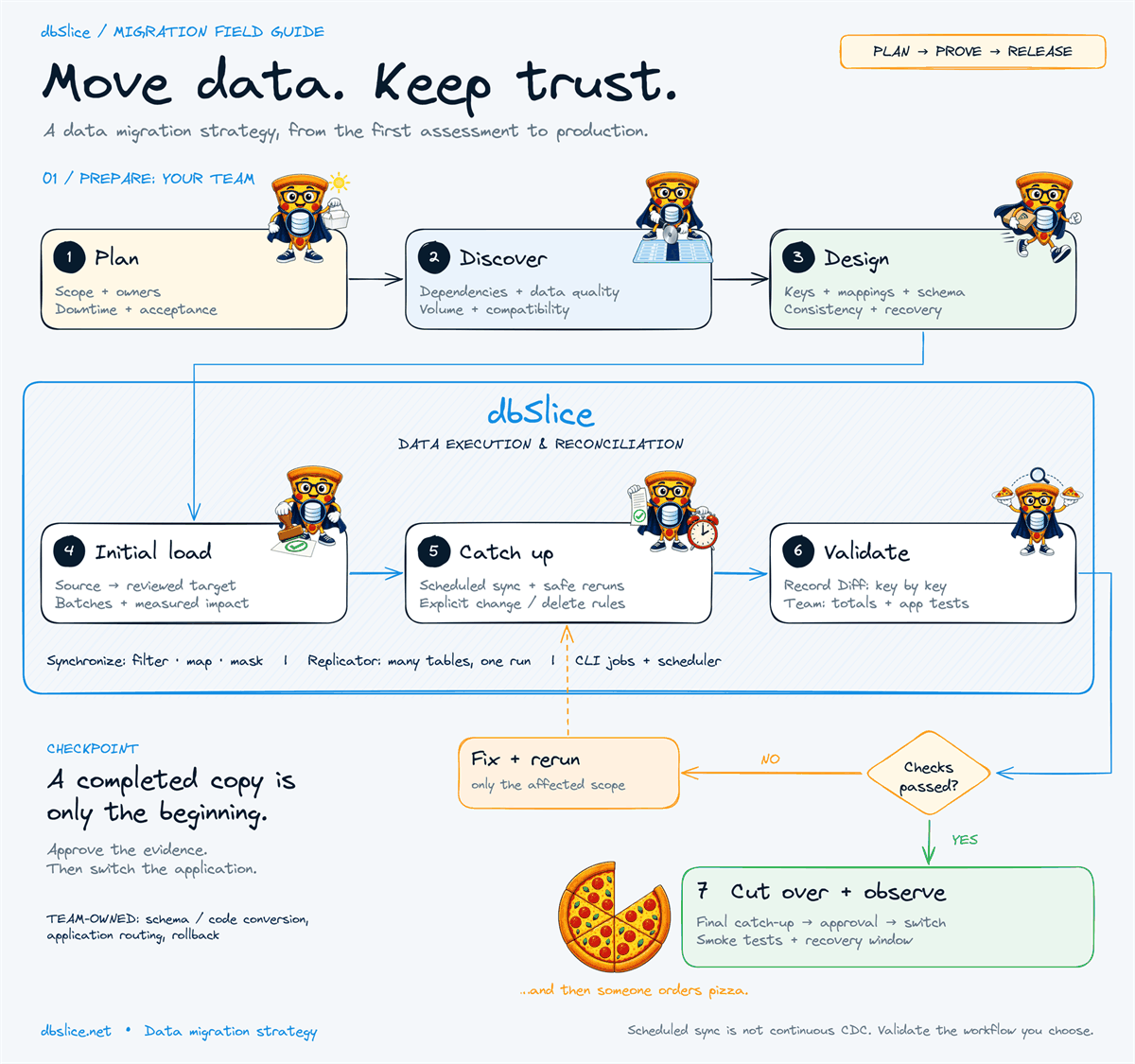
Plan the migration, run repeatable data operations, and release only after validation.
What should a data migration strategy include?
Start with a written agreement between the application owner, the database team and the operations team. It should name the migration scope, accountable owners, permitted downtime, recovery objectives, reconciliation rules and rollback conditions.
Make acceptance measurable. "The data looks right" is hard to defend. "All required customer keys exist, order totals reconcile, no unexplained orphan records remain, and critical application tests pass" is a release decision someone can review.
Keep data movement separate from application and database-code changes. Copying tables does not translate stored procedures, triggers, views, permissions or application queries. The Oracle to PostgreSQL guide draws this line explicitly: dbSlice handles the data, while database code needs its own conversion and review.
Key factors that shape the migration
| Factor | Questions to answer | Effect on the plan |
|---|---|---|
| Business impact | Which services depend on these records? How long may writes stop? | Defines cutover timing and the rehearsals you need. |
| Volume and shape | How many bytes, wide rows, large objects and historical partitions? | Drives transfer sizing, batching and validation cost. |
| Change rate | How fast do inserts, updates and deletes accumulate? | Decides whether scheduled catch-up can converge. |
| Compatibility | Do types, encodings, collations and timestamp semantics match? | Creates mappings and application changes to test. |
| Identity and relationships | Are keys stable? Which parent tables must arrive first? | Sets load order, matching and safe reruns. |
| Access and capacity | Which permissions, network paths and resources are available? | Limits feasible tools, throughput and impact. |
| Security and recovery | Which fields are sensitive? How will recovery be proven? | Defines masking, access, evidence and rollback. |
Treat this table as a discovery checklist, then replace assumptions with measurements from your own environment.
Step 1: Define scope, ownership and success
List the tables, date ranges and business entities that belong in the destination. Include downstream reports, integrations, scheduled tasks and exports that may keep reading the old system.
Name an owner for each critical acceptance test. A database engineer can verify keys and constraints; a business owner should confirm that invoices, balances and order statuses still mean the same thing.
Define the recovery time objective and recovery point objective for the transition. Decide who can stop the migration and what evidence authorizes the production switch. These decisions belong in the runbook before the first rehearsal.
Step 2: Discover the source and assess the target
Inventory tables, keys, dependencies, indexes, identity generators and database code. Profile representative values: nulls, duplicate business keys, oversized text, unusual dates and unexpected encodings.
Review application compatibility alongside database compatibility. An application may depend on case-insensitive comparisons, implicit numeric conversions or engine-specific SQL even when the tables copy cleanly. Microsoft's migration assessment guidance likewise separates compatibility findings, target readiness and sizing.
For large legacy systems, measure the actual extraction query. A complicated view can dominate runtime even when the destination writes quickly. Where full counts are expensive, start with metadata estimates and bounded range measurements, and budget exact reconciliation separately.
Step 3: Choose the migration pattern
| Pattern | Suitable when | Main trade-off |
|---|---|---|
| Offline migration | A planned write outage fits the copy and the checks. | Simple consistency boundary; longer interruption. |
| Phased migration | Entities, tenants or services can move independently. | Smaller releases; more coexistence and routing work. |
| Initial load + scheduled catch-up | Keys are stable and a reliable method finds changed rows. | Shorter final outage is possible; freshness depends on job duration and frequency. |
| Log-based CDC | The project needs continuous capture and the engines support it. | Needs dedicated CDC tooling, permissions and operations. |
dbSlice supports initial loads and repeatable synchronization jobs: upsert, insert-new and incremental runs, as the SQL Server to PostgreSQL guide describes. It is not log-based CDC. Choose the pattern against your real freshness requirement.
Scheduled synchronization is not automatic zero-downtime migration. If writes continue, prove that your change-selection method catches updates and that your delete policy is complete before you rely on catch-up.
Step 4: Design mappings, keys and consistency
Write a mapping specification for source columns, destination columns, type conversions, defaults and matching keys. Review decimal precision, time zones, text lengths, Unicode and null semantics. Preserve identifiers when applications or integrations depend on them, and check destination generators before new records are created.
Use dbSlice's Synchronize workflow when a table needs a query source, a row filter, a column mapping or masking. The controlled data movement guide describes these controls, and explains why leaving a field out of the mapping does not prove it was left out of the source read.
Also define a consistency boundary. Independent pages read from a changing database can represent different moments in time. PostgreSQL, for example, documents statement-level snapshots under Read Committed and a stable snapshot under Repeatable Read. Verify the database and tool behavior your project needs; fast pagination alone does not create a consistent snapshot across tables.
Step 5: Rehearse with representative data
Pick a pilot that includes difficult values, large objects, parent-child relationships and frequently updated rows. A tiny table of clean integers is a poor predictor of a production migration.
Run extraction, transformation, loading, reconciliation and application checks end to end. Include a controlled interruption so the team can show the recovery procedure works.
Record end-to-end duration and source impact, fix what you find, and rehearse again. Test masking rules on non-production copies, including whether masked values still satisfy uniqueness and relationships. Masking is one control in the test-data process; review the result before you give the copy wider access.
Step 6: Run the initial load with dbSlice
Confirm source and target connections, matching keys, mappings and write mode before you run. Keep the reviewed configuration with the runbook, and keep credentials out of reusable job definitions.
For many straightforward table pairs, the Replicator runs the selected tables in one pass. Use Synchronize when a table needs filtering, mappings or masking. They are not interchangeable: the Replicator guide notes that its Record Diff is a key-only check and that resuming an interrupted table is done in Synchronize.
Choose a load order that respects dependencies. Watch source latency, destination write capacity, storage growth and transaction-log pressure. A transfer that finishes fast while causing a business outage has missed the point.
Step 7: Catch up and make reruns predictable
If the source stays active, document how each run finds changes. A timestamp watermark needs more than an updated_at column: test late commits, equal timestamps, clock assumptions and rows updated without a timestamp change. We wrote up the two most common traps in Incremental sync missing rows?.
Make deletes explicit. Upsert inserts or updates matching records; it does not, by itself, remove records that were deleted at the source. Choose tombstones, a controlled reconciliation or a final reload where appropriate.
For repeatable execution, dbSlice saves jobs that run from the command line under Windows Task Scheduler or cron. The automation guide covers logs, exit codes, status jobs and optional notifications. Decide how the scheduler prevents overlapping runs and how the operator handles a partial run.
Step 8: Validate technical and business correctness
Validate against the same scope and the same comparison boundary. Comparing a moving source with an older destination produces differences that reflect timing, not a failed transfer.
Use several layers of evidence:
- Coverage: required tables, partitions and key ranges are present.
- Identity: missing keys, unexpected keys and duplicates are explained.
- Values: critical columns match under the documented conversion rules.
- Relationships: constraints and orphan checks satisfy the target design.
- Business meaning: totals, balances, statuses and representative workflows reconcile.
- Application readiness: reads, writes and integrations pass on the target.
Equal counts are only a screening check: two tables can hold the same number of rows and different customers or amounts. dbSlice's Compare lists records missing in the target, extra in the target and with different values, key by key; this walkthrough shows the same check used after an integration failure.
Budget validation time and resources explicitly. The AWS DMS documentation is a useful reminder: row validation uses extra source, target and network capacity, and adds time beyond the transfer itself.
Step 9: Cut over, observe and keep a recovery path
Use a timed checklist: stop or route writes as designed, drain in-flight work, run the final catch-up, reconcile the agreed boundary, get approval, switch application connections and run smoke tests. Microsoft's cutover guidance stresses a coordinated plan with owners, validation and contingency.
State the rollback boundary precisely. Before the target accepts new writes, going back may be simple. After it accepts writes, returning traffic to the source can lose new data unless you have a tested way to move it back.
Watch errors, latency, business totals and queue backlogs during a defined stabilization period. Retire the source only after acceptance, retention and recovery requirements are met. Then order the pizza.
Best practices that make the strategy repeatable
- Keep mappings and job settings under change control; rerun the pilot when they change.
- Use the minimum permissions each operation needs, and protect exported files.
- Test failure recovery with the exact mode and workflow planned for production.
- Reserve time for validation, catch-up and decision making in the outage estimate.
- Measure with representative data and production-like constraints.
- Keep an evidence record: configuration, timestamps, boundaries, logs, differences and approvals.
For context, dbSlice publishes a production example of 12.96 billion rows moved in 1 day, 16 hours and 40 minutes, with the conditions described on its performance page and in this article. It is a vendor-reported result, not a throughput guarantee or an independent comparison. Use your own pilot to estimate your migration window.
Put the strategy into practice
Start with one representative table and a written acceptance checklist. Set up the mapping, run the initial transfer, exercise your catch-up rules and verify the result before you expand the scope.
dbSlice brings data movement, synchronization and reconciliation into this workflow. The migration team remains responsible for compatibility decisions, application readiness and the production release.
Explore dbSlice, read the migration guides, and check editions and pricing before planning production writes. The free Microsoft Store version is the evaluation entry point; writing to a target database needs a Desktop or Server license.
Planning a system replacement and need help designing the coexistence? Thinwork can run the project with you.
Frequently asked questions
What is the difference between data migration and data synchronization?
Migration moves a defined workload to a destination as part of a transition. Synchronization repeats data operations to keep an agreed relationship between systems. A migration can use synchronization while the old and new systems coexist.
Can a database migration have zero downtime?
Some architectures support very short interruptions or continuous service, but that depends on change capture, routing, transaction handling and application design. A scheduled data-copy job alone does not guarantee it.
Where does dbSlice fit in a migration strategy?
In data transfer, selected transformations and masking, repeatable synchronization and reconciliation. Schema and database-code review, business acceptance, application switching and rollback remain explicit project workstreams.
How do you estimate the migration window?
Measure extraction, transformation, loading, final catch-up and verification in rehearsal. Add the time to stop writes, make the release decision and run application checks, plus a contingency based on the variation you saw.
Engine guides: SQL Server to MySQL · MySQL to PostgreSQL · Oracle to PostgreSQL · SQL Server to PostgreSQL sync
More demos: watch all dbSlice demo videos.