
Choosing between Kafka and REST? →
Moving data between two databases is only one kind of integration. Many systems do not accept rows at all: they accept requests and messages. A partner exposes a REST endpoint, a legacy platform publishes a SOAP service, an internal service speaks gRPC, a database accepts writes only through a stored procedure, an internal pipeline reads from a topic or a queue. Feeding those systems usually means writing a small program that reads the source, renames fields, converts types, builds a payload, and handles the response.
The Send Data tab covers that work inside dbSlice. It reads records from a source, maps them to a JSON model with per-field transforms, and delivers each record to the destination you configure. The operator sees the payload before anything leaves the machine and sees how the destination answered afterwards.
This guide follows the screens of the Send Data tab, and its statements were reviewed against the application implementation of dbSlice 2.3. It explains what each step is for and how to approach a first delivery carefully. Availability can vary by version and license.
1. One record at a time, from source to destination
Send Data treats the source as a stream of records. Each record goes through the same four stages, and the screen is organized around them.
The tab has three numbered steps—Source, Model and mapping, and Destination—and a common area below them with the outcome counters, the action buttons, and the execution log. New, Load, and Save at the top let you keep a configuration and reopen it later.
2. Choose the source
The first step defines where the records come from.
| Source | What it reads | Typical use |
|---|---|---|
| Database | A table, a view, or a SELECT on any saved connection, with an optional filter and an optional key column for key-based paged reading. | Publish reference data, push changed rows to a partner API, feed a queue from an operational table. |
| JSON file | An array at the root, a single object, a collection at a path such as data.items, or NDJSON (one JSON object per line). | Replay an export, forward records produced by another tool. |
| CSV file | A delimited text file. You set the delimiter, the quote character, whether there is a header, the encoding, and the text that means null. | Load a spreadsheet extract into an API that has no bulk import. |
For a database source, a query is often the better choice than a whole table. Select only the columns the destination needs and filter the rows in SQL. A smaller, explicit result set is easier to preview and easier to explain when someone asks what was sent.
With the source chosen, Read structure and sample reads up to 100 records, lists each field with a suggested type and a sample value in the execution log, and creates the initial mapping. For a user table from a synthetic documentation dataset, that listing looks like this:
id             Integer    1
company_id     Integer    1
permission_id  Integer    1
username       String     demo.user.00000001
display_name   String     Demo User 00000001
email          String     user.1@example.invalid
is_active      Integer    1
created_at     DateTime   2023-01-01
Read this listing before mapping anything. It shows the types dbSlice detected, which is where most payload problems start: a flag stored as an integer, a date that needs a specific format, a code with leading zeros that must remain a string.
3. Build the model and the mapping
The second step is a grid with one line per field of the outgoing record, and a live preview of the resulting JSON beside it.
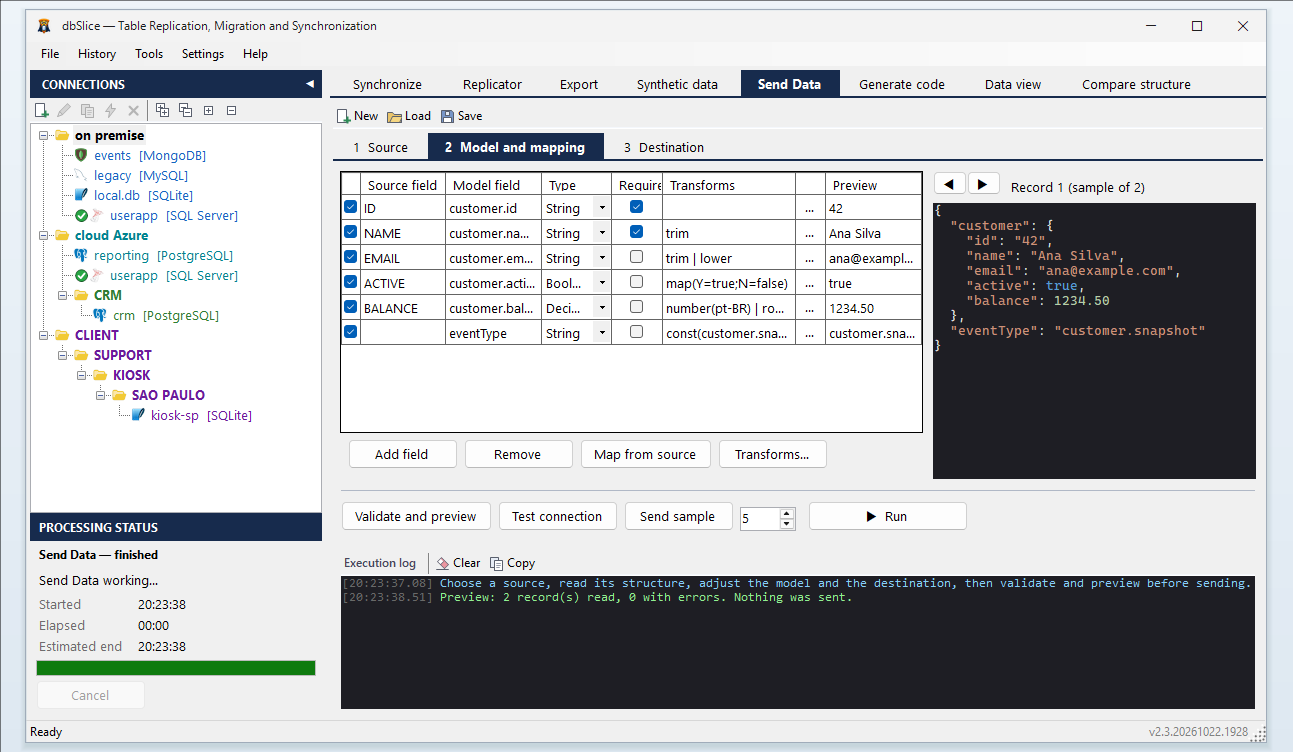
Model and mapping, with demonstration data. The preview on the right is built from the first sampled record.
| Column | Purpose |
|---|---|
| Checkbox | Include or leave out the field without deleting the line. |
| Source field | The field read from the source. A line without a source field produces its own value, with const, uuid, record, or runid. |
| Model field | The name in the outgoing JSON. A dotted name such as customer.id places the value inside a nested object. |
| Type | The type to produce: String, Integer, Decimal, Boolean, or DateTime. |
| Required | Marks a field that must have a value for the record to be valid. |
| Transforms | One or more operations applied to the value, chained with |. |
| Preview | The value after the transforms, for the sampled record. |
Map from source fills the grid from the source fields, which gives a starting point with one line per column. Add field and Remove adjust the list. Transforms..., or the … button inside a Transforms cell, opens the transform editor, where each step can be tested with a sample value.
The demonstration screen shows the kinds of transform a payload usually needs:
| Transform shown | Effect on the demonstration record |
|---|---|
trim | Removes surrounding spaces from the name. |
trim | lower | Cleans the e-mail address and converts it to lower case. |
map(Y=true;N=false) | Turns a Y/N flag into a JSON boolean. |
number(pt-BR) | Reads a number written with Brazilian separators and emits a JSON number. |
const(customer.snapshot) | Emits a fixed value for a field that has no source column, such as an event type. |
There are 22 transforms. They are fixed operations with parameters; there is no script or free expression.
| Group | Transforms |
|---|---|
| Text | trim, upper, lower, replace(from,to), substring(start,length), prefix(text), suffix(text) |
| Empty and fixed values | default(value), nullif(value), const(value) |
| Lookup | map(A=x;B=y;*=z). Without the * entry, an unknown value is an error for that record. |
| Numbers | number(culture), round(digits) |
| Dates and booleans | date(format,culture), dateformat(format), bool |
| Protection | mask(visible), sha256 |
| Structure and generated values | json, uuid, record, runid |
With the lines of the demonstration screen, the preview for the first record is:
{
  "customer": {
    "id": "42",
    "name": "Ana Silva",
    "email": "ana@example.com",
    "active": true,
    "balance": 1234.50
  },
  "eventType": "customer.snapshot"
}
The arrows above the preview move through the sampled records. Use them. A mapping that looks right for the first record can still fail on one with an empty e-mail, an unexpected flag value, or a number in another format.
Design the model for the receiver. The database column names are an internal detail. Name the model fields the way the destination's contract names them, and send only what that contract asks for.
4. Choose the destination
The third step starts with Destination type. The rest of the form changes with the type selected.
| Destination type | What dbSlice does with each record | Authentication options |
|---|---|---|
| REST API | Makes an HTTP request with the method you choose: POST, PUT, PATCH, DELETE, or GET. | None, basic, bearer token, API key (header or query parameter), OAuth2 client credentials. |
| SOAP | Calls an XML web service (SOAP 1.1 or 1.2). The WSDL can be read to find the operations. | None, basic, bearer, WS-Security UsernameToken. The UsernameToken carries the password as text, so use HTTPS. |
| gRPC (unary call, .proto) | Makes one unary gRPC call per record. The model is encoded as the request message of the method, read from the service's .proto file. | None, bearer token, basic, or an API key sent as call metadata. |
| Database procedure (stored procedure / function) | Calls a stored procedure or function once per record, on a connection already saved in dbSlice. Each parameter is fed by a model field. | The saved connection's own credentials. |
| Apache Kafka | Publishes a message to a topic. The topic must already exist; dbSlice does not create it. | Plaintext, SSL, or SASL (PLAIN, SCRAM-SHA-256, SCRAM-SHA-512) with or without TLS. |
| Redpanda | Publishes a message to a topic. The topic must already exist. | Plaintext, SSL, or SASL (PLAIN, SCRAM-SHA-256, SCRAM-SHA-512) with or without TLS. |
| Apache Pulsar | Publishes a message to a topic. | Optional JWT token. |
| RabbitMQ | Publishes a message to an exchange with a routing key. An empty exchange sends to the queue with that name. | User and password, with optional TLS. |
The following three sections describe the REST, gRPC, and database procedure forms. The same source and the same model can be pointed at a different destination type later. That is useful when a flow starts as a direct API call and later moves behind a queue.
5. Configure a REST destination
REST is the most common first destination, and its form shows the decisions every delivery involves.
| Control | Purpose | Initial value on the screen |
|---|---|---|
| URL | The endpoint that receives each record. Model fields can be placed in the path between braces, as in https://api.example.com/customers/{id}. | Empty |
| Method | The HTTP method used for every request. | POST |
| Body | record sends one record per request. array sends a batch as a JSON array and shows Batch size, initially 100. | record |
| Content type | application/json or application/x-www-form-urlencoded. | application/json |
| Authentication | none, basic, bearer, apikey-header, apikey-query, or oauth2. | none |
| Timeout (s) | How long to wait for each response. | 30 |
| Retries | How many times a request is attempted again, when repeating it is safe. | 2 |
| Idempotency header | Name of a header (for example Idempotency-Key) that carries a key per record, sent on POST and PATCH. Fill it in only if the API implements it. | Empty |
| Allow plain HTTP | Permits an http:// URL. localhost is always allowed, even with the box unchecked. | Unchecked |
| HTTP headers | Extra headers sent with every request. Values can use model fields between braces. | Empty |
| Query parameters | Parameters appended to the URL. Values can use model fields between braces. | Empty |
Body and Content type appear for POST, PUT, and PATCH. GET and DELETE have no body; they carry the record in the path and the query parameters.
Choosing oauth2 as the authentication adds the fields of the client-credentials flow: Token URL, Client ID, Client secret, and an optional Scope. dbSlice requests the token and uses it on the calls to the endpoint.
Retries and repeated requests
dbSlice retries only when repeating is safe. A 429, a 503, or a refused connection is always retried. A timeout or a 5xx is retried for GET, PUT, and DELETE, which HTTP defines as repeatable.
A POST or PATCH that times out is not sent again: the record is counted as Unknown, because the receiver may have processed it. Filling in the Idempotency header, when the API implements one, lets dbSlice repeat those too, sending the same key on every attempt.
6. Configure a gRPC destination
A gRPC destination needs the address of the server and the .proto file that declares the service. dbSlice reads the .proto itself; there is no compiler step and no generated code.
| Control | Purpose | Initial value on the screen |
|---|---|---|
| Read proto… | Opens the .proto file, lists its methods (unary or streaming, request message, request fields), and fills in Proto file and Method. Only a unary method can be chosen. | |
| Server address | The server, as scheme, host, and port only: https://host:443. | Empty |
| Proto file | The .proto that declares the service. Imports are looked up next to it and in the folders above. | Empty |
| Method | The method to call, as package.Service/Method. | Empty |
| Authentication | none, bearer, basic, or apikey-header. | none |
| Import folders | Extra folders for imported .proto files, separated by ;. | Empty |
| Timeout (s) | The deadline of each call. | 30 |
| Retries | How many times a call is attempted again, when repeating it is safe. | 2 |
| Allow plain HTTP | Permits an address without TLS. localhost is always allowed. | Unchecked |
| Call metadata | Name and value pairs sent with every call. Values can use model fields between braces. | Empty |
After you pick a method, the log lists the fields the request message expects. Use those names as model fields. Nested messages match nested model fields (customer.id), lists match repeated fields, and enums accept the name or the number. A model field that does not exist in the message is an error for that record: nothing is dropped silently.
The call uses HTTP/2, with TLS for https:// addresses.
How gRPC results are counted
| Counter | gRPC outcome |
|---|---|
| Confirmed | The server answered OK. |
| Rejected | The server refused the call: INVALID_ARGUMENT, NOT_FOUND, ALREADY_EXISTS, PERMISSION_DENIED, FAILED_PRECONDITION, ABORTED, OUT_OF_RANGE, UNIMPLEMENTED, UNAUTHENTICATED, and RESOURCE_EXHAUSTED after the retries. |
| Unknown | DEADLINE_EXCEEDED, UNAVAILABLE, INTERNAL, UNKNOWN, CANCELLED, DATA_LOSS, or a timeout. The server may have processed the call. |
| Not sent | There was no connection, or the record does not fit the request message. |
Only UNAVAILABLE, RESOURCE_EXHAUSTED, and a refused connection are retried.
7. Configure a database procedure destination
Some databases accept writes only through stored procedures, so that the rules stay in one place. This destination calls a procedure or function once per record, using a connection already saved in dbSlice.
| Control | Purpose | Initial value on the screen |
|---|---|---|
| Connection | One of the saved connections. A connection marked read-only is refused. SQLite is not available, because it has no stored procedures. | |
| Read procedures… | Lists the procedures and functions of the connection with their parameters and types, and fills in the name, the kind, and the parameter grid. The list is read from the catalog; nothing is executed. Available for SQL Server, PostgreSQL, and MySQL/MariaDB. | |
| Procedure | The name as the database knows it, with the schema if needed: dbo.insert_leave, public.myinsert. | Empty |
| Kind | auto, procedure, or function. Auto follows the declaration in the database. | auto |
| Procedure parameters | One line per parameter: the parameter name and, as the value, the model field between braces. | Empty |
In the parameter grid, an empty value uses the model field with the same name as the parameter, ignoring a leading _ or @. Any other text is a template and is sent as text.
For a procedure declared as dbo.insert_leave(@sno int, @eid int, @sd date, @ed date, @sid int, @status bit), the grid would be:
@sno     {sno}
@eid     {employee.id}
@sd      {sd}
@ed      {ed}
@sid     {sid}
@status  {status}
How each engine is called
| Engine | Call |
|---|---|
| SQL Server | EXEC procedure @parameter = value, by name. Procedures only. |
| PostgreSQL | SELECT function(…) or CALL procedure(…), with a cast to each declared type. |
| MySQL / MariaDB | CALL procedure(…) or SELECT function(…). |
| Oracle | BEGIN procedure(…); END;. Procedures only. |
| Firebird | EXECUTE PROCEDURE procedure(…). |
| InterSystems IRIS / Caché | CALL procedure(…). |
On SQL Server, PostgreSQL, and MySQL/MariaDB, dbSlice reads the declaration from the catalog. The parameters go in the declared order, whatever the order of the grid, and each value is converted to the declared type before the call: an ISO date text becomes a date, and Y/N becomes a boolean.
On the other engines, the name and the parameters are typed in, the order of the grid is the order of the call, and values are sent as they are.
Each call is committed on its own. There is no transaction around a group of records, so a run that stops halfway leaves the earlier records written.
How procedure results are counted
| Counter | Procedure outcome |
|---|---|
| Confirmed | The call returned without an error. |
| Rejected | The database returned an error: a rule inside the procedure, a duplicate key, an invalid value. Its message goes to the log. |
| Unknown | The connection was lost or the call timed out. The database may have completed it. |
| Not sent | There was no connection, or a parameter points to a field that the model does not have. |
8. Decide what happens when a record fails
The Execution group controls how a run behaves when something goes wrong.
| Control | Purpose | Initial value on the screen |
|---|---|---|
| On record error | Whether the run stops or continues after a record fails. | Stop at the first error |
| Stop after errors | Applies when the run continues after errors. It counts every failure (invalid, rejected, unknown, and not sent), and the run stops when the total passes this number. | 100 |
| Record limit | The maximum number of records to process. 0 means no limit. | 0 |
Stopping at the first error is the right default for a new flow: the first failure usually reveals a mapping or contract problem that would repeat on every record. Continuing makes sense once the flow is known to work and occasional bad records are expected.
Record limit is a simple way to grow a delivery in stages: ten records, then a thousand, then everything.
9. Validate, test, and send a sample
Three buttons let you check the work before a full run. They answer different questions, and it is worth using them in this order.
| Button | Question it answers | Does it send data? |
|---|---|---|
| Validate and preview | Do the first 20 records produce valid payloads with this model? | No. |
| Test connection | Can dbSlice reach the destination? For REST and SOAP it opens the connection (and TLS) to the host; with OAuth2 it also requests a token. For Kafka, Redpanda, and RabbitMQ it authenticates and checks that the topic or exchange exists. For Pulsar it connects to the broker. For gRPC it opens the connection (and TLS) to the server without calling the method. For a database procedure it connects and, where the catalog is available, checks that the procedure exists, without calling it. It never sends a record and does not prove write permission. | No. |
| Send sample | Does the destination accept real records? The number beside the button sets how many of the first records are sent. | Yes, the sample only. |
The log states the result of a validation plainly:
Preview: 2 record(s) read, 0 with errors. Nothing was sent.A sample of a few records against the real destination is the most informative test. A successful connection test does not show that the credential is accepted by a REST endpoint or that the account may write. The sample does: it exercises the URL, the authentication, the payload shape, and the receiver's validation rules together, at a size that is easy to inspect and easy to undo on the other side.
10. Run and read the outcome
Run asks for confirmation, then processes the source up to the record limit. The Processing status panel, under the connection tree, shows the start, the elapsed time, the estimated end and the counters of the run, and holds the Cancel button, which stops a run in progress. The counters summarize what happened to the records.
| Counter | Reading |
|---|---|
| Read | Records read from the source. |
| Confirmed | Records the destination acknowledged. |
| Invalid | Records that failed mapping, validation, or a transform. They were not sent. |
| Rejected | Records the destination answered by refusing. |
| Unknown | Records that were sent but got no confirmation back: a timeout, a connection lost while sending, or a run cancelled during a send. They may or may not have arrived. |
| Not sent | Records that never left the machine: there was no connection to the destination, or the run stopped before their turn. |
The separation matters because each group calls for a different action. Invalid records are fixed in the source or in the mapping. Rejected records are a conversation with the owner of the destination. Unknown records are the delicate ones: check the destination before sending them again, since some may have arrived.
Keep the execution log of a real run. Copy places it on the clipboard so it can be stored with the change record or the ticket that requested the delivery.
11. What Send Data does not promise
Send Data delivers records and reports what happened to each one. Knowing its boundaries helps decide where it fits.
- No exactly-once guarantee. A record can be delivered more than once when a repeatable request is retried, and a run that stops can leave records unsent. Make the receiving side tolerant of repeats.
- Unattended runs have no resume. A saved configuration can run as a job from the CLI jobs screen or from the command line, so it can be scheduled. A run that stops does not continue from where it stopped: plan the source query so a new run selects only the remaining records.
- No schema registry integration. Messages published to a broker carry the JSON you modeled. Agree on the format with the consumers.
- gRPC: unary calls only. Streaming methods, server reflection, compression, and client certificates are not supported, and the response message is not read, only the status.
- Database procedure: inputs only. Output parameters and result sets are not read, and records are not grouped in a transaction. Functions can be called on PostgreSQL and MySQL/MariaDB only.
Running a saved configuration as a job
A configuration saved from the tab is a *.dbsend.json file. It runs as a job of type send, either with Run now in Tools → CLI jobs or from the command line:
dbSlice --new send delivery.json
dbSlice delivery.json delivery.log
The first command creates a template; the second runs the job and writes its log. The exit code is 0 on success, 1 when at least one record was not confirmed, and 2 for an invalid job or a missing license. The e-mail and webhook notifications of a job work as they do for the other job types.
A scheduled delivery therefore works, with the same boundaries as a manual one: no resume and no exactly-once. Check the exit code and the counters in the log, and design the source query and the receiver so that running again is safe.
12. Credentials, network, and license
Send Data connects only to the addresses you configure: the API endpoint, the web service and its WSDL, the token URL, the gRPC server, the database of the saved connection, or the broker. The records go from the machine running dbSlice to that destination.
Credentials entered for a destination stay on that machine, protected for the current Windows user. The saved file contains no secret in clear text, and it does not work under another Windows account or on another machine until the secret is typed again. The same applies to a scheduled job: it must run as the Windows user who saved the configuration.
A database procedure destination uses the credentials of the saved connection; nothing new is stored in the configuration for it.
Treat a saved configuration as sensitive anyway: it documents an endpoint and how to reach it. Use a credential created for this purpose, with only the permissions the delivery needs, and prefer HTTPS endpoints.
Send Data is part of dbSlice 2.3, in the Desktop and Server editions, both in the tab and as a job. Configuring a flow, validating it, and previewing payloads work without an active license. Send sample, Run, and the job require one.
A careful first delivery
- Write a source query that returns only the fields and rows the destination needs.
- Click Read structure and sample, read the field listing in the log, and confirm the suggested types.
- Rename the model fields of the initial mapping to match the destination's contract.
- Add transforms and step through several sampled records in the preview.
- Configure the destination against a test environment first, if one exists.
- Run Validate and preview and resolve every record with errors.
- Run Test connection, remembering what it does and does not check for your destination type.
- Use Send sample with a small number and verify the records on the receiving side.
- Set a Record limit for the first real run and leave On record error on stop.
- Run, read the counters, and keep a copy of the log.
Scope of this guide
The controls, initial values, and log lines described here were taken from screenshots of the Send Data tab. The behavior of the sources, transforms, destination types, authentication options, retries, connection test, counters, and jobs, and the version and license notes, were reviewed against the application implementation of dbSlice 2.3.
The gRPC destination was exercised against a test server without TLS. The database procedure destination was exercised against PostgreSQL, SQL Server, and MariaDB test databases; the Oracle, Firebird, and InterSystems commands follow each engine's syntax and were not run against those engines.
The field listing and the payload use synthetic demonstration data. No request was sent to a live API, web service, or broker to create this article, and no delivery rate or timing is claimed. The connection names visible in the original screenshots are not part of the publication.