PostgreSQL is rarely just PostgreSQL. A production database often carries TimescaleDB for time series, PostGIS for maps or pgvector for AI embeddings, and it may run on a PostgreSQL-compatible service such as Google AlloyDB. Each one changes something in a data migration: the way tables are stored, the column types or what the target needs before the load.
This guide goes through each one: what changes when you move data in or out, and how dbSlice handles it.
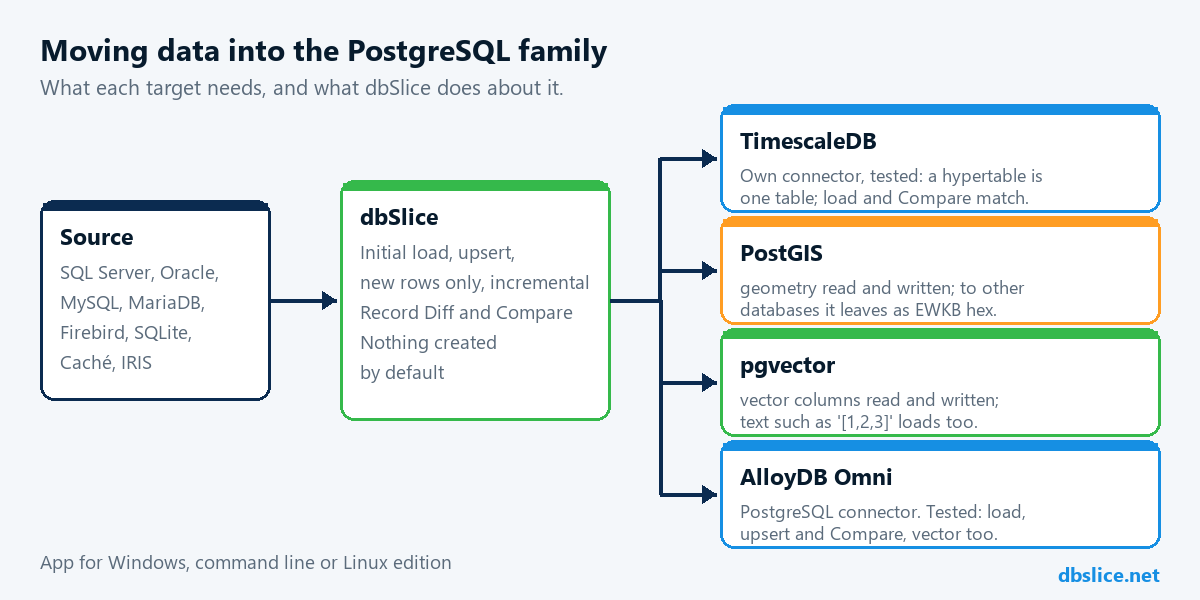
Data migration from and to TimescaleDB
TimescaleDB turns a table into a hypertable: one logical table split into time chunks behind the scenes.
- Tested on a real TimescaleDB. dbSlice has its own TimescaleDB connector. A hypertable appears as an ordinary table, and the extension's internal schemas (
_timescaledb_*) stay out of the table list, so you never pick a chunk by mistake. In our lab, an Initial load into a hypertable and a Compare of both sides matched row for row. - Migrating to TimescaleDB from SQL Server or Oracle: create the table, run
create_hypertableon the time column and then copy with Initial load. Order the copy by time when you can. - Upsert and New rows only by the id alone are not possible. TimescaleDB requires every unique index on a hypertable to include the time column, so a key on the id alone cannot back them. dbSlice explains this on screen and points to Initial load or Full load, or to a unique index that includes the time column.
- Compressed chunks: when the target has compressed chunks, dbSlice warns at the end of the copy that updating those time ranges is slow. Check the compression policy before you plan updates into old ranges.
Tables with PostGIS columns
PostGIS adds geometry and geography; this section covers geometry. Other databases store spatial data differently (SQL Server has its own geometry and geography; MySQL has spatial types with different rules), so spatial columns are the part of the table that needs a plan.
- dbSlice reads and writes
geometrycolumns. From PostgreSQL to PostgreSQL, the values copy as they are, and Initial load, Upsert and Compare work on them. - To other databases, geometry leaves as EWKB hex text. If the target needs WKT, convert the column in the source query:
SELECT id, name, ST_AsEWKT(geom) AS geom FROM parcels. EWKT keeps the SRID; on a SQL Server source, the equivalent isgeom.STAsText(). - WKT text loads into PostGIS. When the target column is
geometry, dbSlice writes WKT or EWKT text such asSRID=4326;POINT(1 2)and PostGIS converts it. Compare then reports those rows as different, because PostGIS stores the shape in its own format, not as the text that was sent. - The migration assessment flags spatial columns in SQL Server ⇄ PostgreSQL migrations before you start.
Tables with pgvector embeddings
pgvector adds vector(n) for AI embeddings: lists of numbers, written in text as [0.12,-0.03,0.98].
- dbSlice reads and writes
vectorcolumns, with pgvector and on AlloyDB Omni. Initial load, Upsert and Compare work from avectorcolumn to avectorcolumn. - Embeddings kept as text load too. Text in the pgvector format, such as
'[1,2,3]', written into avectorcolumn is accepted, so vectors stored as text in another database can move into pgvector. - Match the dimension. A
vector(1536)column accepts only vectors with 1,536 numbers. Create the target column with the dimension of the model that produced the embeddings. - Or regenerate them. If the source text is coming along and the model is still available, generating the embeddings again on the target is an option too.
Google AlloyDB and AlloyDB Omni
AlloyDB, and AlloyDB Omni, which runs on your own servers, keep the PostgreSQL protocol and SQL, with a different storage engine underneath.
- Tested with AlloyDB Omni: dbSlice connects with its PostgreSQL connector (host, port, database, user), and Initial load, Upsert and Compare run on ordinary column types such as integers,
varcharandnumeric, and onvectorcolumns. - Migrating to AlloyDB from SQL Server, Oracle or MySQL follows the same steps as plain PostgreSQL. The translated
CREATE TABLEis the one dbSlice shows for PostgreSQL. - Permissions: the managed service gives you a privileged role but no superuser. Options that need ALTER, such as "Adjust the id generator afterwards", need a role that owns the table.
- Network: AlloyDB runs inside a private network by default. dbSlice reads and writes from where it runs, so it needs a route to the instance (VPN, bastion, or the Linux edition running in the same network).
Step by step: convert a table from or to the PostgreSQL family
- Connect to the source and to the target (PostgreSQL, TimescaleDB, AlloyDB, SQL Server, Oracle, MySQL…).
- Pick the source table. If a
geometrycolumn goes to a database other than PostgreSQL, convert it withST_AsEWKTin a source SELECT. - Pick the target table and the key column. On a TimescaleDB hypertable, use Initial load or Full load.
- Choose the mode: Initial load, then Upsert, New rows only or incremental by column where the target allows it.
- Run Record Diff, then the copy, and prove the result with Compare.
Moving data between the PostgreSQL family and other databases
dbSlice by Thinwork moves data between PostgreSQL, TimescaleDB and the other leading databases (SQL Server, Oracle, MySQL and more) from one Windows app, its command line or the Linux edition. See PostgreSQL to SQL Server, SQL Server to PostgreSQL and PostgreSQL to MySQL and MariaDB.
FAQ
- Does dbSlice install or manage extensions? No. By default it creates nothing in your databases. Your DBA installs PostGIS, TimescaleDB or pgvector on the target.
- Are hypertable chunks copied one by one? No. dbSlice reads and writes the hypertable as one table.
- Can it copy pgvector embeddings? Yes.
vectorcolumns are read and written, and text such as'[1,2,3]'loads into avectorcolumn. - Is there a free version? Yes, on the Microsoft Store: it connects, browses, compares and exports to CSV. Writing to a target starts at the Desktop edition.
Planning a system replacement and need help designing the coexistence? Thinwork can run the project with you.