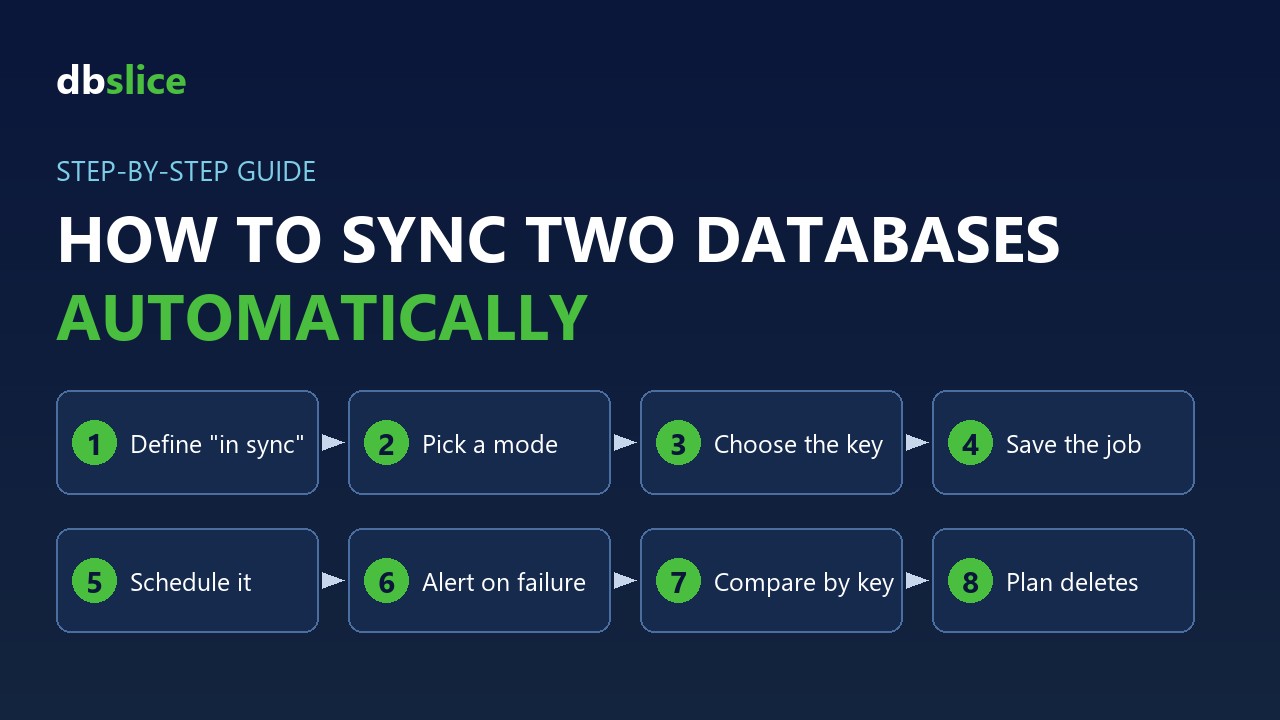
To sync two databases automatically, you need five things: a sync mode that fits the data, a key to match rows, a saved job, a scheduler that starts it, and a check that proves the two sides match. This guide walks through each one. The steps apply to any tool; at the end you will see how they look in dbSlice.
1. Decide what "in sync" means for you
Moving data between two databases on a schedule is not the same as live replication. Answer two questions first:
- How fresh must the copy be? Every night, every hour, or within seconds? If you need each change within seconds, use log-based CDC or the engine's native replication. A scheduled job fits hourly or nightly copies.
- Which way does data flow? One source, one target. Two systems writing to the same tables need a different design, not a sync job.
2. Pick a sync mode
| Mode | What it does | Use it when |
|---|---|---|
| Initial load | Fills an empty target table | The first run |
| Upsert | Inserts new rows and updates changed ones, by key | Most nightly copies |
| New rows only | Adds only the keys the target does not have | Append-only data, such as logs or events |
| Update existing only | Refreshes rows already in the target | The target owns which rows exist |
| Full load | Empties the target table and loads it again | Small tables, or a target you can rebuild each run |
| Incremental by column | Reads only rows with a newer updated_at or sequence id | Large tables where most rows never change |
Incremental runs are the fastest, but they have traps: rows that share a timestamp at a batch boundary and transactions that commit late. A re-read window covers both. See incremental sync missing rows.
3. Choose the key
Every mode above matches rows by key. Use the primary key when there is one. Without it, pick a column or set of columns that is unique and never changes. A bad key turns an update into a duplicate.
4. Save the run as a job
The first run is interactive: you pick tables, check the column mapping and read the log. After that, save everything as a job (connections, source, target, key, mode) so every run is identical. Keep credentials out of the job file and keep the job files under version control.
5. Schedule it
- Windows: Windows Task Scheduler runs the job command at a fixed time.
- Linux: cron runs the same command.
- Give each run enough time to finish before the next one starts, or chain the jobs in one script.
6. Get told when it fails
A scheduled job that fails in silence is worse than no job. Use the exit code in the script that runs it, and send an e-mail or a webhook call when it fails. See job notifications by e-mail and webhook.
7. Prove the two sides match
Counting rows is only triage. Compare source and target key by key right after the sync, and keep the list of divergent keys so you re-sync only those rows. Run the comparison as its own scheduled job. See compare source and target.
8. Plan for deletes
Upsert and incremental runs do not see rows deleted at the source. Use a soft-delete flag in the source, or a periodic key-by-key comparison that lists keys missing from the source, and remove them on purpose.
How this looks in dbSlice
dbSlice is a Windows app (with a command line and a Linux edition in Docker) that syncs data between SQL Server, PostgreSQL, Oracle, MySQL, MariaDB, Firebird, SQLite and InterSystems Caché and IRIS, under one license.
- Modes: Initial load, Upsert, New rows only, Update existing only and Full load, plus incremental reads by column with a re-read window, as in step 2.
- Jobs: everything set on screen can be saved as a job file and run with one command:
dbSlice nightly-orders-sync.json nightly-orders-sync.logThe job writes a log and returns an exit code. Credentials stay in the saved connections.
- Schedule: Windows Task Scheduler or cron. The Linux edition has a built-in scheduler and a job API.
- Alerts: e-mail and webhook on each run.
- Check: Compare matches source and target key by key and saves the full list of divergent keys.
- Your databases stay clean: by default dbSlice creates nothing in them: no triggers, no agents, no extra tables. It is not real time; it runs batch jobs, on demand or on a schedule.
The full walkthrough is on database sync from the command line. For a common pair, see SQL Server to PostgreSQL sync.
FAQ
- Can I sync two databases of different engines? Yes, a key-based sync job works across engines, for example SQL Server to PostgreSQL or Oracle to MySQL.
- Do I need to install anything in the databases? Not with dbSlice: by default it creates nothing there.
- Is it real time? No. It is a scheduled batch sync. For changes within seconds, use CDC or native replication.
- Can I try it? The free version on the Microsoft Store connects, browses data, compares structures and exports to CSV. Writing to a target needs a Desktop or Server license, with a 14-day money-back guarantee.
Planning a system replacement and need help designing the coexistence? Thinwork can run the project with you.