When an integration stops halfway, the first question is not "how do we re-sync?" but "what is actually missing?". Compare the two databases key by key first; re-sync only what the comparison lists. This is a real case from a customer that has run dbSlice in production for years, with the names left out.
What happened
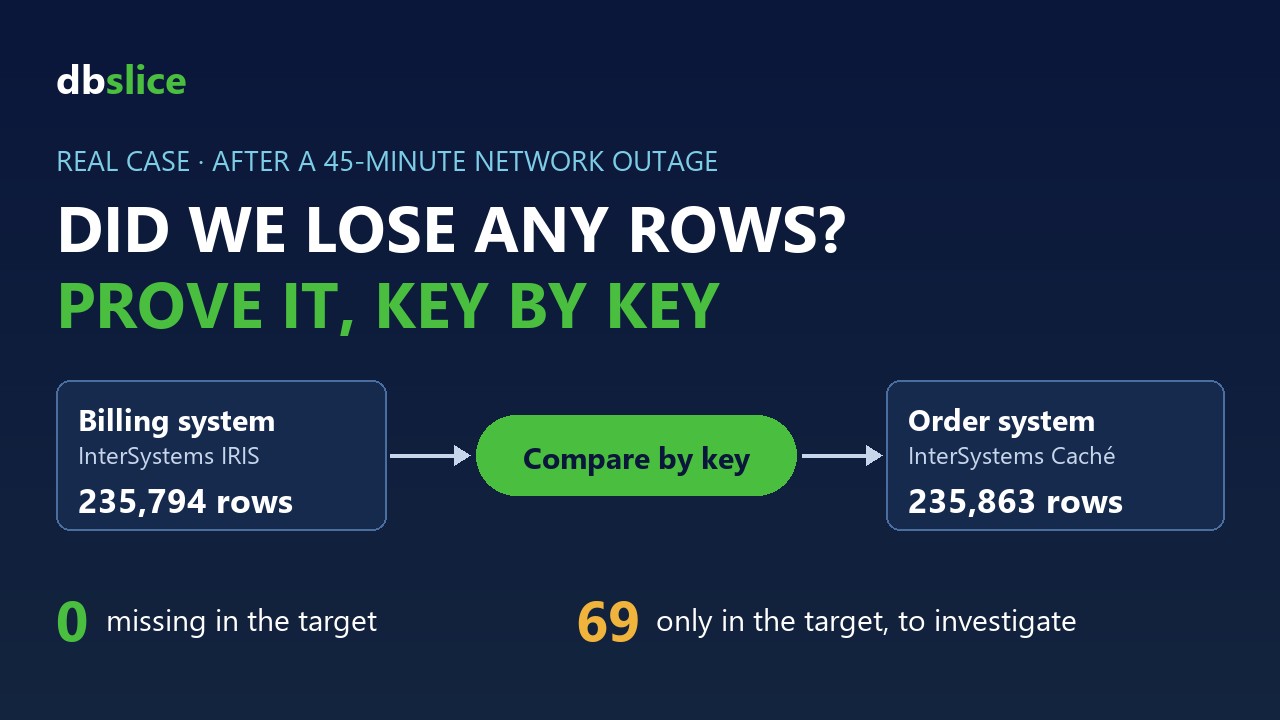
A network outage stopped the integration between two production systems for about 45 minutes: a billing system on InterSystems IRIS feeds an order system on InterSystems Caché. When the network came back, the product owner asked a product analyst, not a DBA or a developer, to find which rows had not made it to the order system and to sync them.
The usual answers to that request are slow: a hand-written query on each side, two exports and a spreadsheet, or a ticket for the database team.
What the analyst did
- Picked the two tables in dbSlice: the source table in the billing system and the target table in the order system, each through its saved connection.
- Chose the key to match rows on: the business key. The first run stopped with a clear message, because the key was not mapped on the target yet; the analyst mapped it and ran again half a minute later.
- Ran Compare, key only. The target connection was marked read-only in dbSlice, so any operation that writes would have asked for confirmation first.
- Saved the full list of divergent keys to a file, and saved the whole setup as a preset to run again.
The result
| Rows | |
|---|---|
| Source (billing system) | 235,794 |
| Target (order system) | 235,863 |
| Matched by key | 235,794 |
| Missing in the target | 0 |
| Only in the target, to investigate | 69 |
The comparison took 177.5 seconds: about 160 s to read and index the target, about 16 s to compare the source against it. Conditions: one real run, not a benchmark; key-only comparison (column values not compared); pages of 500 rows; two InterSystems databases read over the company network; the machine was not measured.
Nothing was missing in the order system. Every one of the 235,794 source keys was already there. The outage had delayed the integration, not lost rows. Instead of a re-sync, the team got a short list: 69 keys that exist only in the order system, to check with the business before anyone deletes or changes them.
That is the point of comparing first. Had the team re-run a full load "just in case", it would have emptied the order system and reloaded 235,794 rows, silently deleting the 69 rows that exist only there. An upsert "just in case" would have rewritten 235,794 rows and still not shown them.
Why key by key, not by count
The two counts differ by 69. A count alone would suggest "69 rows missing somewhere", and the obvious reaction is to copy rows from source to target. The key comparison shows the opposite: nothing is missing in the target, and the 69 are extra rows on the target side, which a reload would have deleted without a trace. Counting is only triage; the key list is the answer. See compare source and target.
A checklist for the next outage
- Compare before you re-sync. List missing, extra and different rows by key.
- Keep the target read-only while you look. Change it only for the rows you decided to fix.
- Save the key list to a file. It is the evidence for the incident report and the input for the fix.
- Check values too when the outage could have cut an update halfway: turn on the comparison of column values, not only keys.
- Re-sync only the listed keys, then compare again to prove both sides match.
- Save it as a job, so the next check is one command, or a scheduled run every night. See database sync from the command line.
How this works in dbSlice
dbSlice by Thinwork is a Windows app (with a command line and a Linux edition in Docker) that migrates, syncs and compares data between the leading databases (SQL Server, PostgreSQL, Oracle, MySQL and more), InterSystems Caché and IRIS included, under one license.
- Compare matches source and target by key and reports rows missing in the target, only in the target and, when you turn it on, different in value. The full list of divergent keys is saved to a file.
- Sync fixes what the comparison found, with the modes Upsert, New rows only, Update existing only and more.
- Your databases stay as they are: by default dbSlice creates nothing in them. It reads in pages by key; the data does not pass through Thinwork.
- InterSystems on either side: Caché and IRIS work as source or target, next to the other databases. See InterSystems Caché and IRIS to SQL Server.
FAQ
- Can a non-developer run this? In this case a product analyst did, from the screen, with saved connections.
- Does the comparison change the databases? No. Compare only reads. Writing happens only when you run a sync.
- Is it a real-time monitor? No. It is a check you run on demand or on a schedule, after an incident or every night.
- Can I try it? The free version on the Microsoft Store connects, browses data, compares structures and exports to CSV. Comparing and syncing data starts at the Desktop edition, with a 14-day money-back guarantee.
Planning a system replacement and need help designing the coexistence? Thinwork can run the project with you.